
- There are no pre-existing assets to create step-by-step instructions
- Work and training instructions are either non-existent or poor quality
- Relevant CAD data or documented procedures are unavailable
- There are highly-regulated standards for safety and compliance
Augmented Reality (AR) and Assisted Reality for digital work instructions have become a growth driver, or at least consideration, for many industries.
Yet moving everything from paper or ‘digital hard-copy’ to digital AR experiences seems to be a daunting task for large and small organizations alike.
The truth is, there are many ways to incorporate augmented reality into service, but many of these can disrupt current processes and be a challenge to implement.
This is why, our company (EAC Product Development Solutions), developed and created an easier way to make service information more accurate, relevant and accessible.
It allows you to easily deliver the content behind AR instructions, manuals, and guides to digital devices such as tablets, head-mounted displays, or cell phones.
Implementing AR for service should be easy. That is why we created a better way.
The tool is called AR Instruct – It easily connects traditional technical publication content to the AR world.
Digital Work Instructions & AR Instruct
AR Instruct enables “hands-free” execution of work instructions using the latest immersive technology including: Augmented Reality, Assisted Reality, and Mixed Reality.
Our AR solution works as an AR publishing engine that repurposes existing S1000D, Arbortext, or XML, technical publication content and simplifies the transition to hands-free and mobile paperless instructions.
The best part? AR Instruct requires no content re-authoring and no content rebuilding. It’s really that easy.
AR Instruct can even dynamically publish up-to-date work instructions from the latest document revision on your server. This will ensure accuracy, compliance, and quality.
Watch the video below to get a quick and easy introduction to AR Instruct.
How does AR Instruct work?
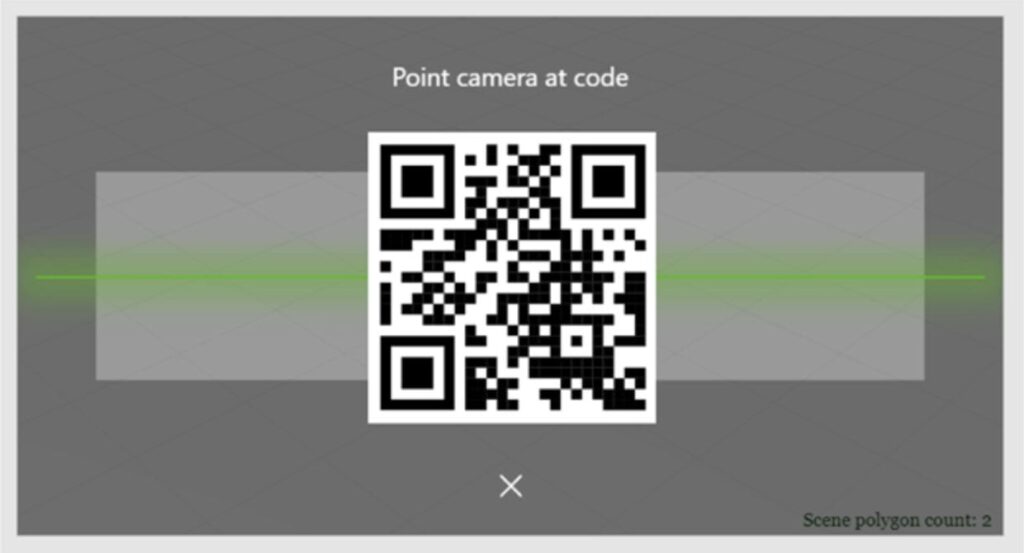
A Service Engineer scans a work order QR code to locate relevant service procedures.
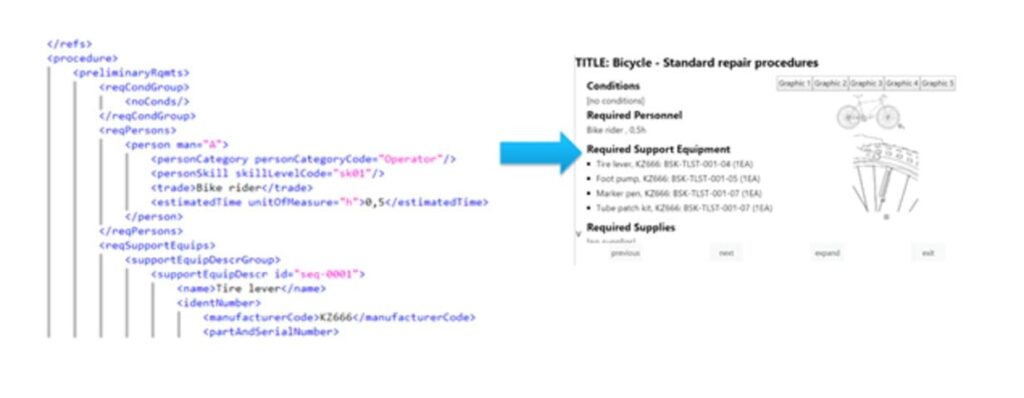
Our AR publishing engine, AR Instruct, retrieves XML content and dynamically formats it for AR viewing. This requires no manual publishing at all.
Using a digital device like a Vuzix or RealWear, the service engineer can navigate the AR content hands-free with voice commands.
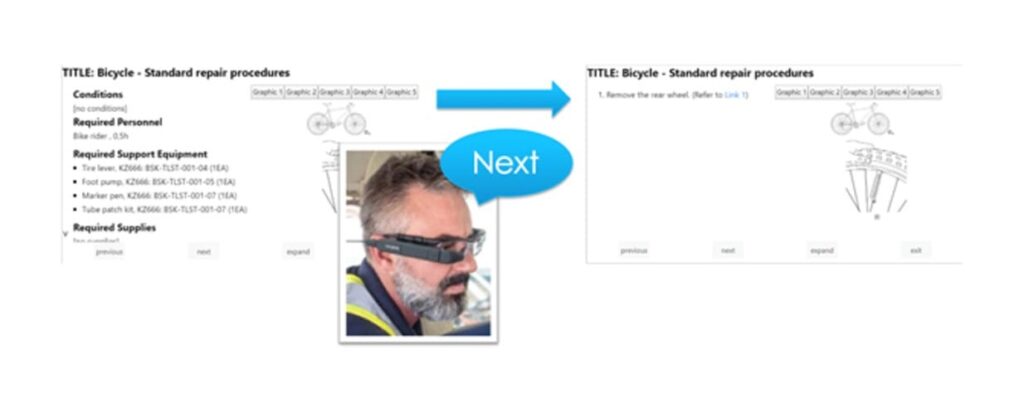
The Service Engineer can inspect each associated technical graphic related to the product.
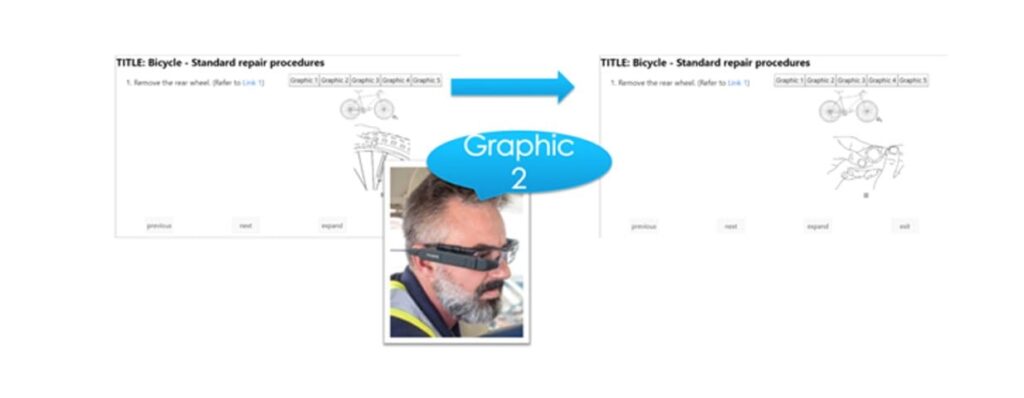
The Service Engineer can also expand any technical graphic or content for enhanced viewing.
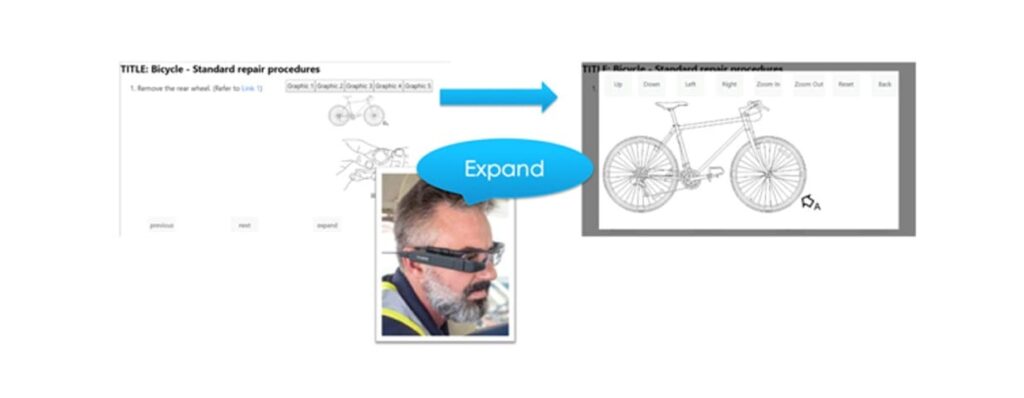
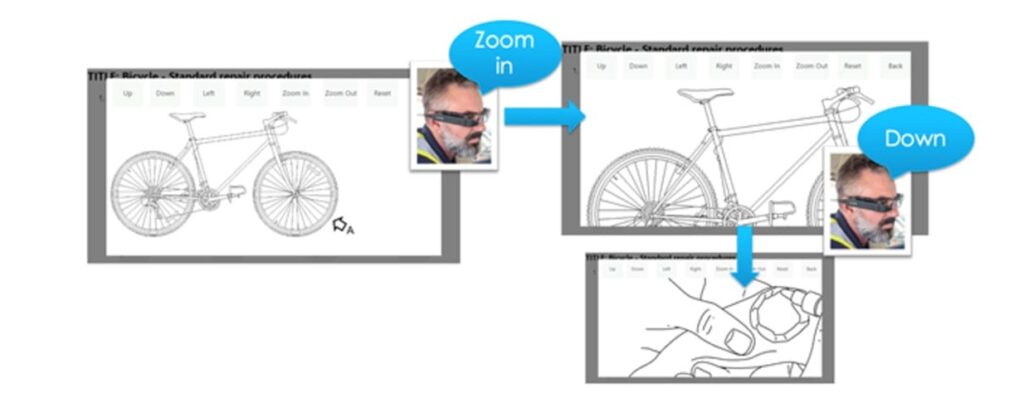
With the AR Instruct graphic viewer, the Service Engineer can pan and zoom any image by using voice commands. All buttons he or she sees are “readable” as voice commands.
Using voice commands, the Service Engineer can navigate links to cross-referenced steps or procedures.
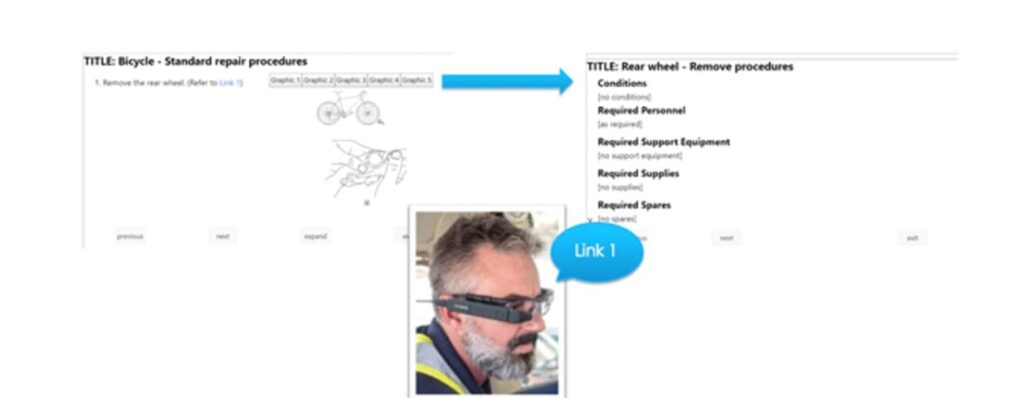
Once the Service Engineer is done with the cross-referenced content, he or she would be able to return to where they left off in the original service procedure.
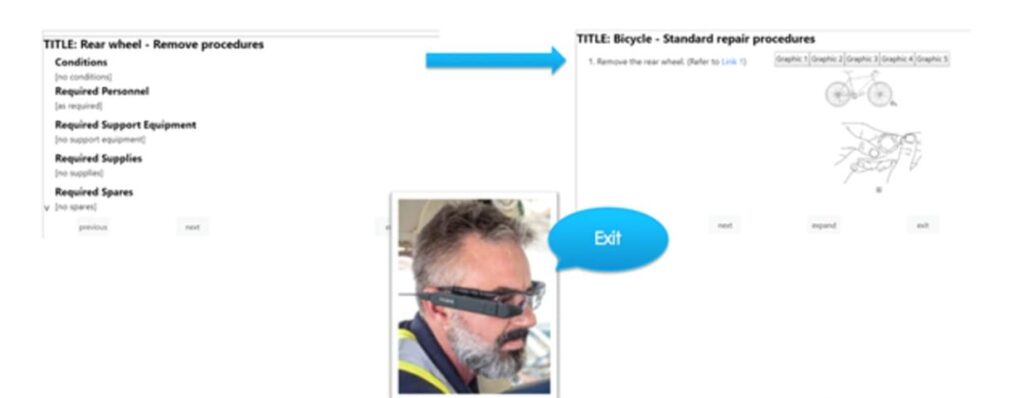
When all steps are complete, the AR Instruct software notifies the Service Engineer that the procedure is done and all steps are recorded as complete.
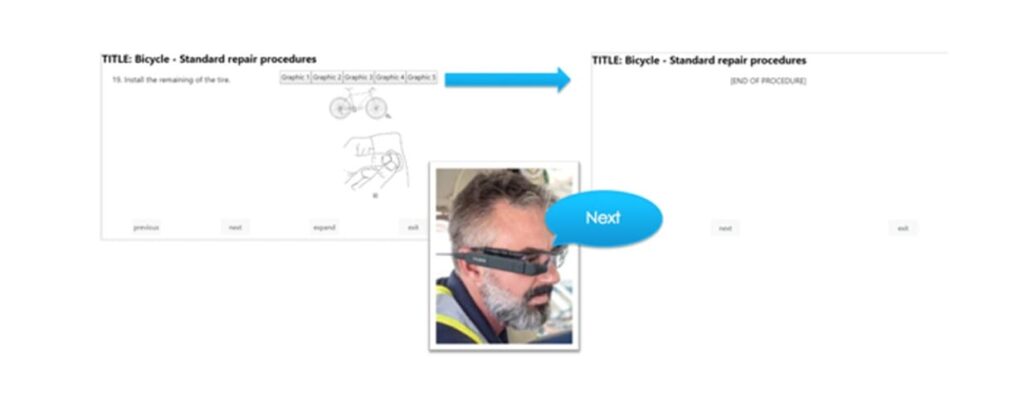
The Service Engineer exits back to the bar code scanner to begin a new work order or procedure.

It’s really that easy.
If you are looking to improve operational efficiency, appeal to the modern workforce, execute service checklists 3-5% faster and enable greater compliance and quality assurance over completed work instructions, AR Instruct is exactly what you need.
Want to see AR Instruct for yourself? Request a Demo today.
PTC is expanding its Augmented Reality (AR) solutions with another powerful Vuforia product – Vuforia Expert Capture. The technology allows an expert or skilled worker to ‘capture’, or record, their manual procedures on the manufacturing floor to then deliver the recorded step-by-step instructions to new hires or other employees to perform that same procedure.
Vuforia Expert Capture empowers front-line workers with the confidence to do their jobs with increased productivity and improved efficiency with easily viewable procedures by using a hands-free, AR-enabled, wearable headset, such as the Microsoft Hololens or RealWear HMT-1.
How does Vuforia Expert Capture work?
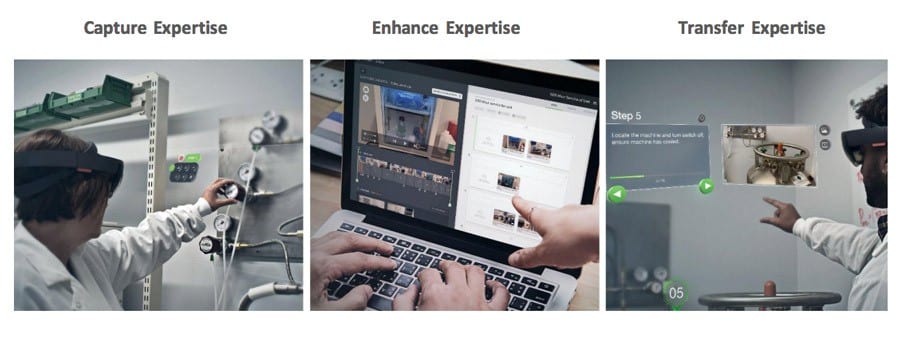
Vuforia Expert Capture uses three different AR-enabled technologies to create location-specific AR guidance including Vuforia Capture, Vuforia Editor, and Vuforia View.
Vuforia Capture: An expert uses the Hololens or RealWear to record the procedure with the Vuforia Capture software downloaded into the wearable device.
Vuforia Editor: A content creator uses Vuforia Editor, an editing software, to edit, modify, or add to the captured procedure and then publishes it.
Vuforia View: A new hire or other employee uses a Hololens, RealWear, mobile phone, or tablet device with the downloaded Vuforia View software to then perform the captured procedure.
The skilled worker, or subject-matter-expert (SME), can use voice or gesture-controlled commands to take photos or add bookmarks during the recorded procedure. The bookmarks would then allow the editor to focus in on highlighted parts of the procedure and add additional content such as a still image, a 3D CAD file, or links to other resources available through the organization’s existing content.
Who benefits from using captured AR experiences?
Your organization can benefit the most in manufacturing, service, and training uses cases where:
The knowledge from SMEs can be captured instantly without causing too much disruption from daily work activities while reducing the need for rigorous training for other workers.
PTC’s customer, Global Foundries, a global full-service semiconductor manufacturing company, has found success with the implementation of using Vuforia Expert Capture:
“
Michael Campbell, EVP of AR products at PTC, says in a press release, “We are excited to offer industrial enterprises a new way to use AR to leverage the tribal knowledge of SMEs and help alleviate the skills gap crisis threatening today’s industrial enterprise. Vuforia Expert Capture is a high-value, out-of-the-box solution that accelerates AR content creation that enables manufacturers to not only improve the accuracy and speed at which workers successfully complete new or unfamiliar tasks, but also to reduce training costs and time to productivity.”
Campbell, in a recent webcast that introduced the new product release, says that PTC is working on allowing users to use Vuforia Chalk, Vuforia Studio, and Vuforia Expert Capture in sync with one another. This would allow content creators to embed 3D CAD files into the procedures while editing captured processes in Vuforia Editor or it would allow employees new to procedures to essentially ‘dial-in’ to a remote expert with Vuforia Chalk to then ‘talk’ him through the procedure while seeing assisted chalk overlays onto real-world equipment.
You can start implementing AR in your organization with Vuforia Expert Capture to rapidly capture high-value procedures from the expert’s point-of-view. Contact us to talk to an AR expert: you can request more information or ask for a live demo with your team on-site.
Check out our Augmented Reality Gallery for more real-world use cases for Industrial AR.
Download our product brief on Vuforia Expert Capture to learn more about PTC’s AR product.
The aging workforce crisis is affecting field service companies in a huge way. Kris Oldland, a B2B author, wrote an article for Field Service News called The Aging Workforce Crisis Is Not Only Real But It’s Here – How Are We Going To Resolve It?. Oldland’s research found that 53% of field service companies believe that replacing an aging workforce is a challenge for their organization.
Here’s how we should be addressing the aging workforce – by protecting older generations.
Protecting older generations
According to a report written by the United States Senate on ‘America’s Aging Workforce’, challenges such as age discrimination, inadequate training opportunities, and working while managing health conditions and disabilities are making it difficult for older workers to thrive in the workplace. Not everyone is ready for retirement – whether it’s due to financial reasons or they’re just not ready to stop working. It is projected that by 2026, working individuals that are 55 and older will make up 24.8 percent of working Americans – which will account for almost one in every four American workers (United States Senate, America’s Aging Workforce).
So how can field service companies help protect older generations from losing their jobs due to these challenges? We don’t need to ‘replace’ the aging workforce – we can still leverage their vast amount of knowledge and experience. Service organizations should be leading the way by providing solutions for older generations to continue working by eliminating or at least significantly decreasing travel time and cost it takes to service equipment on-site.
How do you do this? Provide your employees with an augmented reality (AR) tool such as Vuforia Chalk.
What is PTC Vuforia Chalk?
PTC’s Vuforia Chalk is built on the Vuforia AR platform technology from PTC. You can draw digital annotations on your device that accurately anchor to physical objects in the real world so that the receiver of your communication through the app knows exactly how to solve the problem via your instructions.
Vuforia Chalk allows field service technicians to help customers without having to travel to get to them. Chalk is an app that empowers service technicians by providing them with instructions and guidance they need to quickly solve technical challenges. Both experts and technicians can accurately mark up live views to highlight details or guide multi-step solutions.
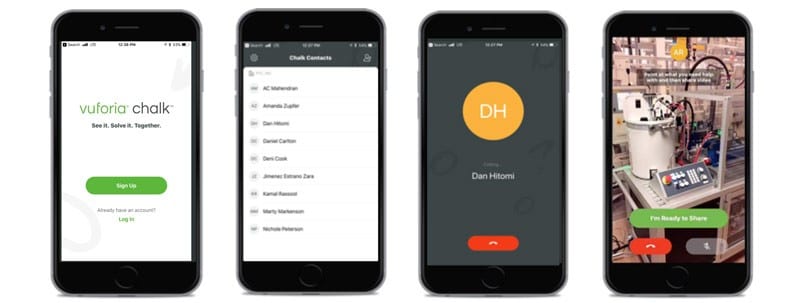
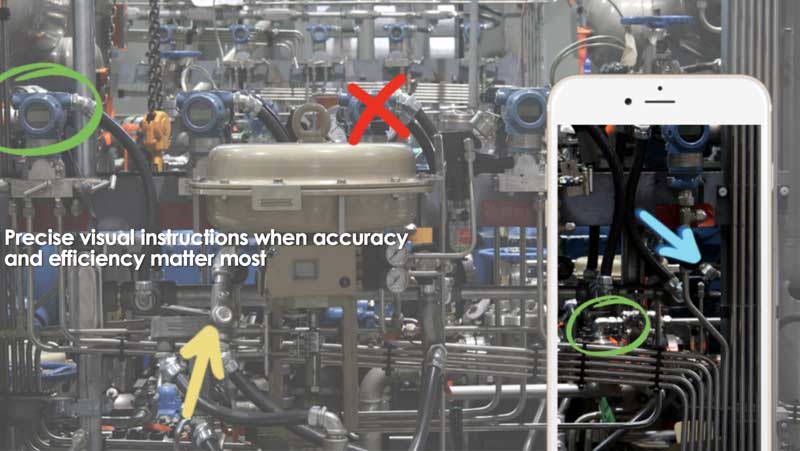
Chalk marks where you instruct on the screen, leaving ‘still’ marks where you’ve placed them, even if you’re moving your device around. You can move your device out of view, and your chalk marks will still be seen drawn where you put them.
AR is one of the fastest growing segments in the market, allowing Chalk to easily launch as an app that service companies are immediately attracted to. Organizations are seeing that the investment draws in new levels of workforce productivity and efficiency for those that can work remotely and cost-effectiveness for less money spent on travel.
How can AR help with remote assistance?
Older generations are easily able to learn PTC’s Vuforia augmented reality tools as something that can be incorporated into their service processes.
Our recent webinar called, Vuforia Chalk: Powerful Remote Guidance at your Fingertips, gathered valuable survey information from our attendees: 50% of our respondents told us that their service technicians on average travel 50-100 miles radius from where they work to get to service calls, and the other 50% of respondents told us that they travel more than 100 miles to service their customers.
Think of the costs incurred with that kind of travel. The back and forth communication, the talk with human resources to plan the trip; the expenses of a rental car and/or plane tickets; the time lost to work due to travel; et cetera. The list goes on and on. When, in reality, you can use a simple AR app remote assistance app such as Vuforia Chalk to problem-solve from the comfort of your own office or home.. or anywhere for that matter.
When we asked our webinar attendees if ‘the availability of an office-based remote-expert role would increase the retention of retiring technicians and their knowledge’ – Fifty percent said ‘Yes’, and the other fifty percent said ‘Maybe’. Become a leader in the field service industry and offer your aging workforce the chance to work remotely. After all, there’s a one in four chance that the aging worker could be your grandparent.
Download the free trial of PTC Vuforia Chalk today, to see if this could be a tool that could keep older generations from feeling any repercussions of the aging workforce. Contact us if you’re interested in Vuforia Chalk.
PTC is changing the way Creo Design software is being sold. As of January 1st, 2018 new 3D modeling software licenses for PTC’s core solutions are only available by subscription in North America.
This makes it easier for users to utilize new functionality and keep up with the latest release of PTC Creo Parametric CAD software. It also gives organizations the flexibility to choose a 3D CAD package according to specific needs at a given time, and ensures access to the latest capabilities and premium support.
Changes in PTC Creo CAD Packaging
PTC has retired and consolidated the following CAD packages into one of 4 new tiered PTC Creo Parametric Design packages: Essentials, Essentials Plus, Essentials Premium, Engineer 1, Essentials Team, Engineer 2, Engineer 3, and Engineer 4.
You can see from the table below that Creo Design Essentials (T1) replaces Essentials, Essentials Plus, Essentials Premium, and Engineer 1; Creo Design Advanced (T2) replaces Essentials Team and Engineer 2; Creo Design Advanced Plus (T3) replaces Engineer 3; Creo Design Premium (T4) replaces Engineer 4; and Creo Design Premium Plus (T5) is an entirely new package that becomes the fifth tier for the new Creo packaging.

New PTC Creo Design Packages
With Creo Parametric and its extensions you can create, analyze, view, and share designs using 2D CAD, 3D CAD, parametric design and direct modeling capabilities along with additive manufacturing, model-based definition (MBD), and smart connected design. Every package includes the industry’s most comprehensive set of 3D CAD tools to allows you to design with maximum potential.
Every package comes with the Core Capabilities and the power to publish, share, and create augmented reality experiences right inside of your 3D CAD models. This allows you to add value to your customer experience because they can now visualize your design with AR.
Here’s a breakdown of what is included in each package:
Creo Design Essentials
- Creo Parametric
- Design Exploration Extension
- Flexible Modeling Extension
- Human Factors
- Human Factors Analysis
- Advanced Framework Extension
- Collaboration Extension for Autodesk Inventor and SolidWorks
- Intelligent Fastener Extension
- Legacy Data Migration Extension
- Piping and Cabling Extension
- Render Studio Extension
- Mathcad Express
- Simulation Elite (Linear Structural Analysis)
Creo Design Advanced
**includes everything in Design Essentials and also includes:
- Prismatics and Multi-Surfaces Milling Extension
- Advanced Assembly Extension
Creo Design Advanced Plus
**includes everything in Design Advanced and also includes:
- Interactive Surface Design Extension II
- Behavioral Modeling Extension
- Mechanism Dynamics Extension
- Additive Manufacturing Extension – Standard
- Tolerance Analysis Extension
- GD&T Advisor Extension
- Tool Design Extension
- Expert Moldbase Extension
- Mold Machining Extension
- Layout Extension
**includes everything from Advanced Plus and also includes:
- Collaboration Extension for CATIA V4 and V5
- Collaboration Extension for NX
- Simulation Extension
- Fatigue Advisor Extension
- Flow Analysis
- GD&T Advisor Plus
- Production Machining Extension
- NC Sheetmetal Extension
- Mathcad
Creo Design Premium Plus
**includes everything from Design Premium and also includes:
- Advanced Simulation Extension
- Complete Machining Extension
- Flow Analysis Plus
- Options Modeler Extension
- Topology Optimization
- Additive Manufacturing Extension – Plus
For more details on the extensions in each of the new packages, watch our webinar replay, “New PTC Creo Design Packages Overview.”
FAQ on New Packaging
Q: What is the price for existing customers upgrading to the new packages?
A: If you already have a subscription license, then you may upgrade to the new packaging through a contract amendment. If you are still on a perpetual license, then you may convert and upgrade at the same time and pay the subscription conversion price.
Q: Do the new packages contain PTC Windchill?
A: Creo Design Advanced (Tier 2) contains Windchill PDM essentials. Design Advanced Plus, Design Premium, and Design Premium Plus is bundled with Navigate Author, MCAD Data Management I, BOM Management, and Project Management at no increased cost. These three packages will also be available without PDM.
- Q: Do we offer node-locked licenses?
A: We offer a locked license for Design Essentials and Design Advanced only.
Q: Can I still buy Creo extensions that are now bundled in the new packages?
A: Yes, all extensions will still be available to be purchased separately. If you are subscribing to a new package that does not contain an extension that you need, that extension will be available separately.
Q: Are trials for the Creo software available online?
A: Yes, you can download a free 30-day trial here
Q: How would upgrades work if I already have subscription license? Do I pay the difference on the remaining contract?
A: Subscription upgrades are handled through a contract amendment. You would pay the difference between your current package and the upgraded package.
If you have more questions or would like to talk to us about the new Packages and Pricing, then contact us and we’ll give you more information.
Modernized service strategies combine enterprise IT, ‘smart’ technology, and information.
Manufactures are expected to be more demand oriented, data driven, and technologically focused. This means focusing on the customer, using the data collected from many different areas, and digitally executing strategies using platform technologies.
Many companies today are focusing on the current stage of achieving field service excellence. This tends to be an easier, stand-alone area to focus on as it incorporates vast amounts of technology available to help and support them.
The next stage deals with moving towards connected service platforms which oftentimes involve an integration of smart, connected products. This is when companies will start to deal with how to capture data, leverage the insights, and turn it into actionable results for various stakeholders throughout the organization.
The last stage deals with achieving servitization optimization. Servitization is an important concept because it holds the potential to transform how products are delivered and monetized. This is really the movement towards product service systems and products-in-use value.
Ultimately, providing access to product and parts information is a crucial step in on the path to successful profitable growth.
Technology is fueling service transformation for many organizations.
For instance, here’s how ‘service’ has begun to transform with the help of new technologies:
- Cloud technologies have enabled greater access to service parts visibility and information.
- Mobile technology has put information in the hands of service technicians, at the right time.
- Big data analytics now capture asset and product information, enabling enhanced service quality with better first-time fix rates.
- And social technology has allowed engineers, service, and customer support to collaborate.
These cloud, mobile, social, and big data analytics technologies have enabled manufacturers to transition from systems to service, from information to innovation.
Our team is prepared to help you achieve field service excellence. Our Product Development Information Services team is experienced in the architecture, implementation and support of a technology portfolio making service excellence a reality for many of our customers.
It’s finally here, the next big thing-Augmented Reality (AR) AR is finally moving from ‘a neat idea’ to ‘a necessary tool.’
Like any new technology, AR has gone through its awkward teenage years; clumsy, hasn’t grown into its ears, and doesn’t quite know what it wants to do with its life. It’s no different than the likes of portable computing, the smart phone, or any other modern technological marvel. (here’s a hilarious slide show of the early life of portable computing from itworld.com)
AR is finally coming into focus for many companies. People in various roles are starting to see how AR can reduce human errors, simplify the transfer of information, and provide insight to end users and managers alike. And I’m not even going to get into the endless possibilities involving customer engagement and experience. When a technology moves from video games and parlor tricks into serious applications like technical publications, assembly instructions, maintenance and support, and plant operations…it’s arrived.
Computing power and hardware has all but caught up to the demands of AR applications. Your company should either have, or be working on a strategy to take advantage of AR. If you don’t believe me, then maybe you’ll believe the Harvard Business Review. EAC Product Development Solutions is here to support your adoption of Augmented Reality and other Internet of Things (IoT) smart connected operations and product applications. Whether you’re getting a plan together, trying to obtain buy-in from the rest of your organization, selecting the right software platform, implementing a solution, or developing ‘experiences’ (that’s what AR and IoT applications are typically called); we’re here. We have teams of experts to make sure you successfully transform the way you design, manufacture, connect to, and service your products and organization.
As the leading PTC North American partner we offer our customers all of PTC’s technology solutions: ThingWorx, Windchill, Creo, Arbortext, Vuforia, Mathcad, etc. We also have a deep knowledge of the tools, applications, and configurations. This allows us to provide first-class consulting, implementation, and support services to ensure people like you are successful. Give us a call.
