
Modernized service strategies combine enterprise IT, ‘smart’ technology, and information.
Manufactures are expected to be more demand oriented, data driven, and technologically focused. This means focusing on the customer, using the data collected from many different areas, and digitally executing strategies using platform technologies.
Many companies today are focusing on the current stage of achieving field service excellence. This tends to be an easier, stand-alone area to focus on as it incorporates vast amounts of technology available to help and support them.
The next stage deals with moving towards connected service platforms which oftentimes involve an integration of smart, connected products. This is when companies will start to deal with how to capture data, leverage the insights, and turn it into actionable results for various stakeholders throughout the organization.
The last stage deals with achieving servitization optimization. Servitization is an important concept because it holds the potential to transform how products are delivered and monetized. This is really the movement towards product service systems and products-in-use value.
Ultimately, providing access to product and parts information is a crucial step in on the path to successful profitable growth.
Technology is fueling service transformation for many organizations.
For instance, here’s how ‘service’ has begun to transform with the help of new technologies:
- Cloud technologies have enabled greater access to service parts visibility and information.
- Mobile technology has put information in the hands of service technicians, at the right time.
- Big data analytics now capture asset and product information, enabling enhanced service quality with better first-time fix rates.
- And social technology has allowed engineers, service, and customer support to collaborate.
These cloud, mobile, social, and big data analytics technologies have enabled manufacturers to transition from systems to service, from information to innovation.
Our team is prepared to help you achieve field service excellence. Our Product Development Information Services team is experienced in the architecture, implementation and support of a technology portfolio making service excellence a reality for many of our customers.
Manufacturers always try to find a ways to streamline processes and ‘do more with less.’ It drives success in a world full of competition. One way organizations do this is by reducing process complexity with powerful product life cycle management (PLM) or change management software. Connecting your team directly to live operational data increases efficiency in all departments and allows your organization to save money and manufacture products faster.
EAC Product Development Solutions has partnered with PTC, the world’s product development technology leader, to bring organizations the products and services that they need to succeed in their industry. As a PTC Solutions Provider, we provide the maintenance, support, configuration, and training you need to implement change management software as easily as possible.
PTC Windchill Data Management
If you’re looking to do things like keeping better track of files, create and store Bill of Materials (BoMs), put CAD models and drawings in one place, eliminate the risk of two individuals working on a file at the same time, or secure your data without burdening IT – you’re looking for PTC Windchill.
PTC software – specifically Windchill – is a complete PLM solution that provides capabilities such as:
- Bill of Materials (BoM) Management (EBoM, SBoM, MBoM)
- Configuration and Change Management
- Requirements Capture Management
- Early insight into product quality, reliability, and risk
- Efficiently making product variations with a structured platform
- Product Data Management
- Collaboration across all departments with accurate, up-to-date information
- Seamless software integration and defining standards
PTC Windchill is a PLM solution that provides a smooth transition from design to manufacturing with universal access to all critical product data information so that the process isn’t fatigued with delays.
PTC Windchill, Change Management, eBoM Case Study
ALM Positioners, a leading manufacturer of positioner lifts located in Rock Island Illinois, needed PTC Windchill. The company offers unique, customizable weldments and assemblies that require a lot of CAD models and other product information from engineering before manufacturing even begins. Due to extensive product customization and configuration depending on the needs of their customers, ALM needed a better solution to manage product data. They were drowning in paper files – a lot of which had outdated information.
EAC’s implementation team helped ALM Positioners transition to a digital workflow using PTC’s Windchill software. Windchill helped ALM save up to 4 hours per project by integrating EBoMs and MBoMs into their ERP system.
Watch the ALM Case Study on PTC Windchill to see how it has consistently proven to be a leader in the industry and outperformed competitors when it came to product lifecycle management.
Evolving your BoM strategy, tools, and abilities. “EBoM vs. MBoM” transforms into “EBoM integrates with MBoM.” This integration includes associativity to one another, time saving tools, elimination of error prone manual steps & more.
Imagine eliminating the common disjointed processes, additional time, and error prone manual steps involved in the creation of downstream BoMs from Engineering into Manufacturing, Production and Service management.
Concepts & examples such as Manufacturing Bill of Materials (MBoM) are shown below, all under one system, integrated & associated, and created with a single click. Then they’re easily edited to meet downstream BoM needs.
BoM creation can be streamlined & improved by associatively creating downstream BoMs (S or M or other) and eventually, connecting them to your ERP system. For now, we’ll focus on the first step of this business transformation concept; the creation of the second, or downstream M or SBoM, starting with a simple EBoM example, created in minutes, and easily viewed & tracked.
Who should be involved in this topic at your company? Ideally, your Configuration Manager role should be leading or heavily involved in this process.
The starting point & tool is PTCs Windchill and your willingness to change & improve.
Once your CAD data is ready to check into Windchill, there is an option (check box) to auto-associate the EBoM to a downstream BoM such as an MBoM. It is a 1:1 relationship for starters. Options can branch out from here into many CM (Configuration Management) directions. Such as multi-level BoM management, uses, visualization and more.
Once created, you can manipulate & edit the default 1:1 downstream BoM to your needs; adding bulk items, manufacturing specific sub assemblies, (build throughs) even new service end items. You can also flatten out an EBoM to meet assembly or production needs. BoM items such as adhesive, lubricant, paint or coatings, packaging items, all things that typically are not on an EBoM, can and do belong on the M or SBoM.
If this fits your company’s needs? consider using Windchill’s auto-associate feature.
This article covers a couple examples. If this is not deep enough…here are even more tools to consider. Topics such as creating associated manufacturing instructions, work instructions, work plans and more. Change Management is shown as reference only, it is an optional element of Windchill for another blog.
There are many options to this topic, these are common examples that fit a lot of needs and is considered a starting point.
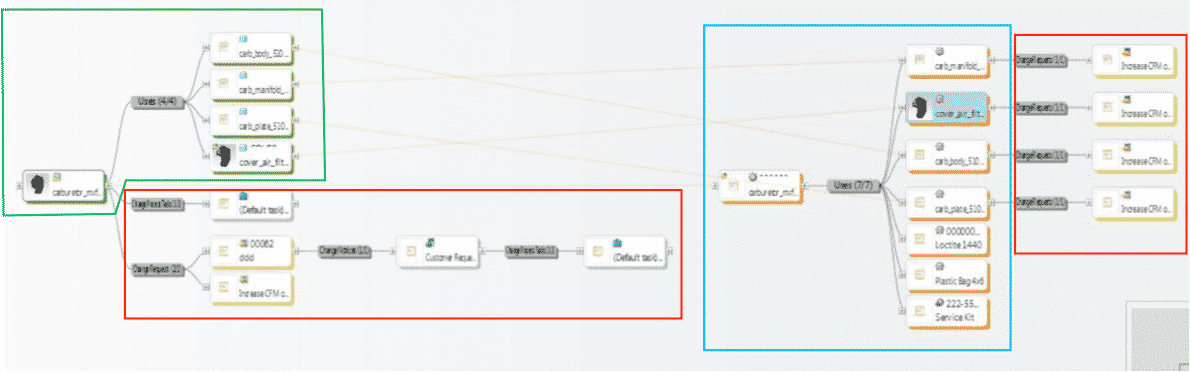
1st example shows all BoM & change components all connected in one system vs. manually done in silo fashion, which is industry’s most common method today. These examples are shown in PTCs Windchill reference viewer tool, which ties all related objects into view for easy visibility with just a few clicks.
- 1. EBoM structure (highlighted in green)
- 2. Change requests, notices and tasks (highlighted in red)
- 3. MBoM structure (highlighted in blue) with their own, or connected Change Management Requests, Notices & Tasks
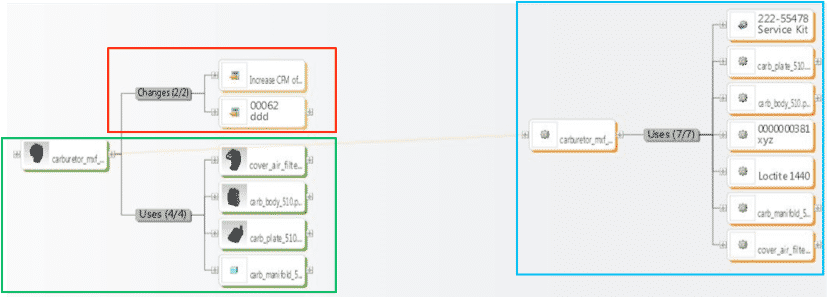
2ndexample shows an EBoM, SBoM (Service Kit in this example), with a saleable end item service kit, as well as components for service or manufacturing BoMs. It also shows Changes, these can also be created, edited, routed, approved or rejected, and even include the SBoM if need be.
Please connect with EAC to learn more, to discover your company’s transformation opportunities with an assessment, maybe see a demo, or attend a webinar. The goal is to help your company transform how you design, manufacture, connect to and service your products.
Setting up enterprise systems can be difficult. For 55% of companies, integrating data has been cited as the most significant hurdle in their data management efforts, along with additional costs from distributing data across the firm. Despite these complications, over 60% of companies still prefer to handle system integrations themselves. It’s time to avoid these costs. Discover our 6 Powerful Reasons to Hire Experts to Implement Your Product Data Management (PDM) and Product Lifecycle Management (PLM) solutions.

1. Implementation is what they know best
Implementation specialists regularly install, implement, and configure product data management (PDM) solutions as well as product lifecycle management (PLM) solutions. Implementation is what they do best! By leveraging the collective experience from a team of implementation specialists, you can ensure that your systems will be properly designed, setup and configured to meet your organizations unique business workflow.

2. You will avoid the creation of an unstable system
Leaning on PLM Integration specialists will help your organization understand the organization’s dilemma, review its actual needs and define a company-wide PLM strategy. Think about the reason you decided to implement these systems in the first place. Odds are your company was attempting to change processes, boost productivity, simplify management and many other things.
There are many cases where companies attempt to configure things on their own, only to end up with an unstable system that is hard to connect. And what good is your new system if your organization is unable to use it?

3. You will reduce your operating costs

A highly experienced staff that specifically focuses on your system’s needs allows your team to avoid wasted time on “the learning curve.” This frees your team to focus on the specialties for which they were hired.
Beyond productivity, implementation support ensures your engineering data is secure, stable, and available; no matter what department is using it. With a properly implemented system, you can be sure your organization will get the most out of your investment, and save time and money.
4. Implementation specialists are familiar with difficult tasks and situations

Implementation teams are trained to handle advanced tasks, no matter the situation. For instance, In the case of a corporate split or a corporate merger, implementation teams are well trained to handle data splitting or data combinations. By using an implementation specialist your organization will greatly accelerate the time and value of your system investment while providing an environment for swift adoption of your new technology. These experts have experience implementing systems right the first time, for companies of all sizes.
5. Implementation specialists can support a variety of products

There are many technical challenges such as customization and data migration that make implementing PLM and PDM solutions complex. Implementation specialists recognize the choices your organization has when it comes to implementing different styles of PDM and PLM solutions. They understand that the out-of-the-box functionalities of your system do not always meet all of your organization’s unique business needs and requirements. By hiring an implementation specialist, you can ensure your system is properly customized and designed to fit your organization’s needs.
6. A successful implementation will motivate system adoption

After implementation comes adoption. This includes training and usability of your system. A trained implementation specialist will help you shift from a traditional technology-centered implementation effort to an end-user centered approach that promotes user acceptance and in turn an accelerated adoption of new processes and technology. This will help your company achieve desired business objectives faster, with less disruption to your organization.
Everything else aside, if you are at the decision stage contemplating whether you should hire an expert to implement your PLM/PDM solution or not, the answer should be a “no-brainer.”
A team of implementation specialists will leverage their technical knowledge, industry expertise, and experience to design and implement a cost-effective system that meets your organization’s unique needs.

We want you to get the most out of your PLM/PDM enterprise solution. Let us know how we can help.
Communicating product data across an organization has become more complex than ever. Here are 9 reasons it’s time to connect your enterprise systems.
With different departments gathering product data form a variety of systems including Product Lifecycle Management (PLM) Systems, Enterprise Resource Planning (ERP) Systems, Manufacturing Execution Systems (MES), and Quality Management Systems (QMS) and more, how do we know our organizations are making the most out of all the information we’re collecting?
Just think about it for a second. Our systems and departments speak different languages, while a company likely aims for a single goal. This is why it can pay to connect your systems and provide company-wide access to business and product knowledge
With an estimated 90% of the world’s data created in the last two years alone (Conner, n.d.), it’s no wonder that companies have trouble utilizing it all. The IDC estimates that just 0.5% of the data we companies produce is ever used. It’s time to change that.
1. Increased Usability
Data experts believe that if Fortune 1,000 companies increased the amount of data they used by just 10%, they could realize over $65 million in additional net income (Marr, 2015). These numbers are huge. Hopefully, they help you understand why I’m writing this blog and pleading my case.
The truth is – our systems are currently too complex for many roles within our organizations to navigate, find, and transfer the right information. This leaves our separate departments accountable for communicating different product data.
So how do we make our product data more usable? By democratizing our product data from all existing sources into one single system.
2. Better Access to Data
The most important reason your product data shouldn’t (internally) be kept a secret is because product data is your company’s most valuable asset. Not everyone who needs access to specific product information hosted in your PLM system is from your engineering department, so why force them through the same vigorous Product Lifecycle system training?
In order to effectively use data, departments must have ready access to it.
After all, the solution to this problem must make rich product information easy to accessible for a broad set of roles. By creating an organized system that connects all of your product data, your organization’s information is easily assessable to users beyond those who have created it. Just think of the possibilities if you connected your data from multiple systems and delivered it to all departments through individualized, role-based views.
3. Complete Data
Imagine an entire enterprise with access to real data, at the right time, when it’s needed. By connecting your product lifecycle management systems with your other enterprise systems, every stakeholder within your organization can leverage product data from multiple systems. They can make accurate decisions based on the latest, most accurate information from EBoM, MBoM, SBoM, ERP, MRP, and QMS data.
4. Better Insights
Better data + better visibility = better insights. Your teams are demanding more at lightning speeds from your PLM processes and solutions. This is another reason why your organization might consider integration technologies and custom front-end solutions.
An enterprise with insights into how current products and processes can be optimized can drastically improve overall productivity. Providing your team with access to up-to-date, accurate product data will allow your organization to have better insight into areas for continuous improvement.
5. Better Decisions
Ready access to information is especially important to any company involved with product development.
Users without access to information often make assumptions and resort to workarounds. This opens the door to poor decisions and errors, quality problems, and waste. Decisions made from out-of-date, inaccurate data threaten product quality and delay time to market.
By providing everyone in your organization with broad visibility into your organization will drive better, more accurate decisions. This will improve your quality, reduce waste, scrap, rework, and meeting your time-to-market goals. The analytics resulting from connected systems help users across your organization make accurate decisions throughout your entire development process.
6. Better Products
Who doesn’t want to create better products faster? Providing your organization with universal access to data will allow your company to drastically accelerate product development. How so? By connecting disparate systems, you will have access to real-time data allowing you to achieve better product decisions. Because your decisions and actions are now driven by up-to-date information, you will achieve a higher product quality.
7. Increased Productivity
Why waste time manually reading, entering and analyzing data, when it could be automatically collected, filtered, and combined? By linking enterprise systems into one simple interface, any user within your organization can access contextual, up-to-date, real-time product information anytime they need. I guarantee your productivity will grow when your organization is able to plan earlier with manufacturing, order materials sooner with purchasing all while your engineering team is spending less time pulling reports.
8. Increased Collaboration
Using a system that provides role-based access for stakeholders provides every role with the ability to quickly understand the status of a part number, inventory, and the part or assembly’s role in the “big picture.” This will not only help mobilize and inform the work of teams throughout the organization, but it will also help maximize the success of your product development. Giving your team the ability to extend and connect your PLM data into the rest of your enterprise will rapidly increase your overall organization collaboration.
9. Real Results
The ultimate benefit your organization will achieve by connecting your systems comes from your ability to get to real results faster. It makes the “to” in “Quote-to-Cash” just a little bit faster. What does that mean? Data gives your organization confidence to quickly deliver value. Good decisions, accurate manufacturing, knowledgeable service groups, self-sufficient marketing and sales teams. This all adds up to faster time to market, faster time to revenue — real results.
So.. what now? It’s time to connect your enterprise systems.
I know what you’re probably thinking, ‘this sounds great, but it’s not that easy to connect and provide role-based access to enterprise systems.’
And you’re right. It would take a tool that connects all of your enterprise systems, right? I’m glad you’ve stuck it out for the long haul because this is what I need to tell you. There IS a solution. It’s called Windchill Navigate. What is it? It is a single role-based app that you can easily access from your smartphone, tablet, or computer where you can literally see all of your product data in one place no matter what department you’re from. Mind blown? We knew we needed to get our hands on it the moment we found out this solution that everyone has been looking for. This is why PTC has trusted us to be a valued solutions provider for their product Windchill Navigate. Learn more about it in our video “Windchill Navigate: Unlocking Product Data for Everyone.”
It’s no surprise that product data is your organization’s most valuable asset. Product data gives the employees within your organization the key to their own day-to-day success. Most enterprise software tools are inaccessible to a broad range of users due to costly licensing, extensive training, and the time it takes to personalize the data for various roles throughout an organization.
Imagine how powerful your company can become with one centralized hub everyone within the organization can access without over complicating the product design process.
EAC Product Development Solutions is a Solutions Provider for PTC – which means we give companies access to the latest technologies that the Industry has to offer for product development.
What is Windchill Navigate?
PTC’s latest genius product has us all jumping up and down with joy as it is something that will ultimately make your lives easier. PTC Windchill Navigate (formerly known as PTC Navigate) is a role-based app that gives your team a platform where every department can access product information through one centralized hub. Instead of having to manually access your Enterprise Resource Planning (ERP) or your Product Lifecycle Management (PLM) system to find the information you need to share with other departments, each individual will have access right from their smartphone, tablet, or desktop computer.
The image below shows just some of the out-of-the-box apps available to PTC Navigate users. Windchill Navigate gives you the ability to customize the apps according to your company’s own organization and data needs.
Windchill Navigate offers a modern user experience that is as easy to use as a smartphone app. It’s time you started unlocking the potential of your product data.
How We Can Customize Windchill Navigate to Fit Your Organization
Our team of developers can customize and configure Windchill Navigate apps for your organization. Check out more information on managing product data and your design process with PTC Windchill Navigate.
