
In today’s fast-paced digital environment, the demand for accurate, consistent, and timely product information is paramount. Traditional methods of technical documentation, often reliant on manual processes and disparate tools, fall short in meeting these demands. This is where PTC Arbortext emerges as a game-changer. It offers a dynamic publishing solution that streamlines the creation, management, and delivery of technical content.
The Pitfalls of Traditional Documentation Methods
Many businesses rely on one or two technical writers to collect all required technical and digital information needed to create technical and marketing publications. Most of this effort is manual, using the tried and true method of emailing, calling, and walking down the hall to bug technical resources for information or a screen grab; over and over. Then the information is created using a one-and-done single-instance authoring software like Adobe FrameMaker, Adobe InDesign, or Microsoft Word.
This is a problem for a number of reasons, including:
- Inconsistencies and Errors: Manual data collection can lead to outdated or incorrect information permeating through various documents.
- Inefficiencies: Repetitive tasks and lack of automation slow down the documentation process, delaying product releases.
- Scalability Issues: As products become more complex, managing documentation manually becomes increasingly untenable.
Just think of everywhere incorrect information could live if an update is missed. Web sites, user manual libraries, manufacturing instructions, service instructions, printed manuals, marketing literature, and the list goes on. This can increase the risk of providing out-of-date or inaccurate information to customers, manufacturing personnel, and service technicians.
Embracing Dynamic Publishing with Arbortext
PTC Arbortext offers a comprehensive solution to these challenges by enabling dynamic publishing. This method automates and integrates the entire documentation lifecycle. Key benefits include:
- Single Source of Truth: Centralize content to ensure consistency across all documentation.
- Automated Updates: Link documentation directly to product data, allowing automatic updates when changes occur.
- Multi-Channel Delivery: Publish content across various formats and platforms without redundant efforts
Core Components of the Arbortext Suite
When arguing for Arbortext, there’s strength in overarching capabilities. However, there’s also the power and precision of its individual components. Like many other PTC product lines, Arbortext boasts a suite of several integrated tools. This robust ecosystem of tools work together to streamline structured content creation, styling, and publishing. This empowers technical teams to do more, faster, and with fewer errors. These extensions have been designed to enhance the documentation process. They include:
- Arbortext Editor: A powerful, XML-based authoring tool designed for creating structured content. It supports real-time validation, ensuring content conforms to required standards as it’s written. This not only improves accuracy but also reduces the need for post-creation corrections.
- Arbortext Styler: A stylesheet design application that lets users visually create and manage styles for multiple output formats. Publishing to PDF, HTML, or EPUB? Styler allows organizations to control formatting rules without needing to write code, greatly simplifying the publishing process.
- Arbortext Publishing Engine: The automation hub of the suite, this engine assembles, formats, and publishes content from Arbortext Editor using predefined styles and templates. It eliminates manual tasks and ensures consistent, repeatable publishing workflows across the enterprise.
Together, these tools form a tightly integrated publishing solution. This solution enables organizations to maintain consistency, scale their documentation efforts, and reduce operational risk. Whether you’re a single author or managing a global documentation team, the Arbortext suite equips you with the foundation to build and deliver content that’s smart, structured, and future-ready.
Integration with PTC Windchill for Enhanced Content Management
One of the most compelling reasons to argue for Arbortext is its seamless integration with PTC Windchill, a leading product lifecycle management (PLM) system. This connection allows organizations to manage both product data and technical content within a single, unified platform. By linking Arbortext with Windchill, companies gain tighter control over content versioning, reuse, and approval processes, which is critical in regulated industries or highly complex product environments.
Windchill serves as a single source of truth, ensuring that content creators always work with the most up-to-date product data and documentation. This reduces the risk of inconsistencies between product updates and technical materials—whether it’s a service manual, part catalog, or training content. Integration also supports granular access control, workflow automation, and traceability, helping teams stay audit-ready and in compliance.
Together, Arbortext and Windchill form a powerful digital thread that connects engineering, manufacturing, and documentation teams across the entire product lifecycle. This integration not only accelerates content creation and delivery but also reinforces data integrity and operational efficiency, making it a cornerstone argument in favor of adopting Arbortext for dynamic publishing.
Real-World Impact: Efficiency and Accuracy
When arguing for Arbortext, it’s essential to look beyond features and focus on real-world outcomes. Organizations that implement Arbortext experience measurable gains in both operational efficiency and content accuracy. By automating manual processes like formatting, layout, and publication, teams spend less time on repetitive tasks and more time on high-value content creation. This leads to faster documentation cycles and reduced time-to-market for products.
Dynamic publishing ensures that information is consistent across all deliverables, minimizing the risk of errors or outdated content reaching end users. Technical writers can generate multilingual, multi-format documents in a fraction of the time it would take using traditional tools, and updates can be made globally with just a few clicks.
Ultimately, Arbortext isn’t just about creating content—it’s about transforming how content is managed, updated, and delivered throughout the organization. These efficiency and accuracy gains drive real business value, making a strong, results-based case for integrating Arbortext into your enterprise content strategy.
Making the Case for Arbortext
In an era where information accuracy and speed are critical, arguing for Arbortext becomes a matter of strategic importance. Making the move from manual technical publications to what we just described allows tech writers to focus on optimization of publishing methods rather than data collection and integration. It helps insure overall accuracy of product data throughout the company and in the marketplace. By transitioning to dynamic publishing with PTC Arbortext, organizations can overcome the limitations of traditional documentation methods, ensuring that their technical content is accurate, consistent, and delivered efficiently across all platforms.
Manufacturers always try to find a ways to streamline processes and ‘do more with less.’ It drives success in a world full of competition. One way organizations do this is by reducing process complexity with powerful product life cycle management (PLM) or change management software. Connecting your team directly to live operational data increases efficiency in all departments and allows your organization to save money and manufacture products faster.
EAC Product Development Solutions has partnered with PTC, the world’s product development technology leader, to bring organizations the products and services that they need to succeed in their industry. As a PTC Solutions Provider, we provide the maintenance, support, configuration, and training you need to implement change management software as easily as possible.
PTC Windchill Data Management
If you’re looking to do things like keeping better track of files, create and store Bill of Materials (BoMs), put CAD models and drawings in one place, eliminate the risk of two individuals working on a file at the same time, or secure your data without burdening IT – you’re looking for PTC Windchill.
PTC software – specifically Windchill – is a complete PLM solution that provides capabilities such as:
- Bill of Materials (BoM) Management (EBoM, SBoM, MBoM)
- Configuration and Change Management
- Requirements Capture Management
- Early insight into product quality, reliability, and risk
- Efficiently making product variations with a structured platform
- Product Data Management
- Collaboration across all departments with accurate, up-to-date information
- Seamless software integration and defining standards
PTC Windchill is a PLM solution that provides a smooth transition from design to manufacturing with universal access to all critical product data information so that the process isn’t fatigued with delays.
PTC Windchill, Change Management, eBoM Case Study
ALM Positioners, a leading manufacturer of positioner lifts located in Rock Island Illinois, needed PTC Windchill. The company offers unique, customizable weldments and assemblies that require a lot of CAD models and other product information from engineering before manufacturing even begins. Due to extensive product customization and configuration depending on the needs of their customers, ALM needed a better solution to manage product data. They were drowning in paper files – a lot of which had outdated information.
EAC’s implementation team helped ALM Positioners transition to a digital workflow using PTC’s Windchill software. Windchill helped ALM save up to 4 hours per project by integrating EBoMs and MBoMs into their ERP system.
Watch the ALM Case Study on PTC Windchill to see how it has consistently proven to be a leader in the industry and outperformed competitors when it came to product lifecycle management.
Stephen Covey’s landmark book ‘The 7 Habits of Highly Effective People’ lists the 7th critical habit as “Sharpen the saw.” It references a parable of a lumberjack and a stranger. The woodsman is very busy cutting down trees. As he completes more and more work his effort increases and his productivity goes down because his saw dulls over time. The lumberjack, exhausted and cursing the labor, is approached by the stranger. “What’s the problem?” asks the stranger. “My saw is dull and won’t cut well” responds the lumberjack. “Why don’t you sharpen it?” asks the stranger. The lumberjack responds “What kind of question is that? Because I would have to stop sawing, and I’m very busy.” The stranger responds “But, if you sharpened your saw you could cut more efficiently than before. You could get even more work done.”
It’s important to sharpen our saw. We need to keep working to improve our knowledge base, approach, and overall situation. This may involve attending a training class, reading a book, mentoring and being mentored, or joining a peer group. I understand this can be difficult in the world of product development / engineering / design / manufacturing / and service. There is always pressure to get to market, get to the trade show, meet customer demands, etc.
Efficient engineering, design, manufacturing, and service requires efficient use of the supporting technologies for each role. Our training group consistently proves a return on our customer’s investment in training and development. That’s because technology keeps getting better. If you don’t know how to take advantage of the full functionality of your tools like PTC Creo, PTC Windchill, PTC Arbortext, and PTC Mathcad…you’re cutting with a dull saw.
We consistently schedule key PTC certified training classes and training courses that help people throughout organizations make the most of their technology. We deliver everything from Windchill Administrator courses to training classes for specific PTC Creo tools and functionality.
Do me a favor. Take time to sharpen your saw. A few days in a training course could save you hundreds of hours down the line. Contact our training group to learn more about our training and mentoring delivery options and full course catalogue. And check out this blog to learn more about how to select a PTC Training Course and Training Class provider.
Most organizations recognize the importance of a ‘speedy response’ to a quality issue or a customer complaint.
In fact, faster service response time has been named as a top priority for many service lifecycle management efforts. The significant demand for manufacturers and service organizations to resolve customer issues promptly, and to quickly mitigate any product quality issues has become a challenge.
How do you overcome this challenge and implement a solution? The equation involves equipping service technicians and customer facing roles with the right information at the right time, along with aligning parts/inventory and service personnel.
For example, let’s look at a very realistic situation.
Imagine your dryer machine breaks down. You call the manufacturer and learn you have to wait three days for a service visit. Depending on your patience (and laundry needing to be done) this could be the beginning of a very unpleasant customer experience.
But what if that same manufacturer was able to pull up your model, and already knew they had visited you a year ago with a similar issue. How might your experience be impacted if they were to tell you there was a 90 percent first-time fix rate for your specific dryer and a technician would be able to show up with the specific parts needed to fix your issue?
This is the type of service that customers want and are starting to expect.
It is easy to see how putting the right information in a service technicians’ hands at the right time is so important.
Service technicians want to be able to see service information and technical service bulletins. They want to see information on the job and have access to just in time training. They have a desire for formal training, tech assist helpdesks and hotlines, and safety instructions.
So how do we enable and empower technicians to optimize service experiences and exceed customer expectations?
Here are some of the best practices that we have gathered:
- 1. Provide access to technical/service parts information when technicians need it
- 2. Make that information easy to search
- 3. Supply accurate product and configuration information including all parts and service history
- 4. Enable easy ways of ordering parts
- 5. Offer just in time training/help
‘Smart’ service management is your key to success.
Your service information needs to be managed at a network level. This ensures that all your players in the service web have access to the right information, at the moment they need it.
Adding a modern layer of accessibility to your information is a critical part of ensuring your service network can operate efficiently and effectively. This is what will help you drive positive customer experiences throughout your product lifecycle.
We offer the technology solutions and technical expertise to make real-time service information delivery a reality. Contact us to learn more about our Product Development Information Services group, PTC’s Arbortext and Service Lifecycle Management technologies, and the PLM solutions that can effectively link together your product data and service part information.
Evolving your BoM strategy, tools, and abilities. “EBoM vs. MBoM” transforms into “EBoM integrates with MBoM.” This integration includes associativity to one another, time saving tools, elimination of error prone manual steps & more.
Imagine eliminating the common disjointed processes, additional time, and error prone manual steps involved in the creation of downstream BoMs from Engineering into Manufacturing, Production and Service management.
Concepts & examples such as Manufacturing Bill of Materials (MBoM) are shown below, all under one system, integrated & associated, and created with a single click. Then they’re easily edited to meet downstream BoM needs.
BoM creation can be streamlined & improved by associatively creating downstream BoMs (S or M or other) and eventually, connecting them to your ERP system. For now, we’ll focus on the first step of this business transformation concept; the creation of the second, or downstream M or SBoM, starting with a simple EBoM example, created in minutes, and easily viewed & tracked.
Who should be involved in this topic at your company? Ideally, your Configuration Manager role should be leading or heavily involved in this process.
The starting point & tool is PTCs Windchill and your willingness to change & improve.
Once your CAD data is ready to check into Windchill, there is an option (check box) to auto-associate the EBoM to a downstream BoM such as an MBoM. It is a 1:1 relationship for starters. Options can branch out from here into many CM (Configuration Management) directions. Such as multi-level BoM management, uses, visualization and more.
Once created, you can manipulate & edit the default 1:1 downstream BoM to your needs; adding bulk items, manufacturing specific sub assemblies, (build throughs) even new service end items. You can also flatten out an EBoM to meet assembly or production needs. BoM items such as adhesive, lubricant, paint or coatings, packaging items, all things that typically are not on an EBoM, can and do belong on the M or SBoM.
If this fits your company’s needs? consider using Windchill’s auto-associate feature.
This article covers a couple examples. If this is not deep enough…here are even more tools to consider. Topics such as creating associated manufacturing instructions, work instructions, work plans and more. Change Management is shown as reference only, it is an optional element of Windchill for another blog.
There are many options to this topic, these are common examples that fit a lot of needs and is considered a starting point.
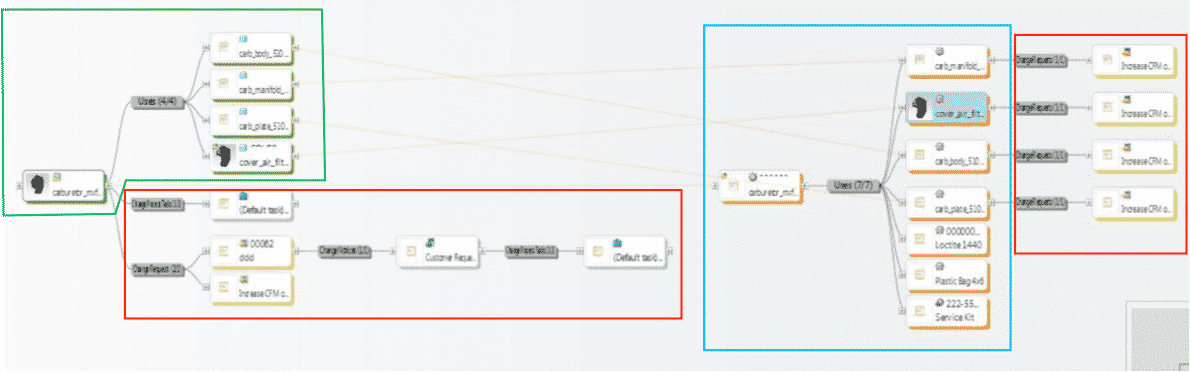
1st example shows all BoM & change components all connected in one system vs. manually done in silo fashion, which is industry’s most common method today. These examples are shown in PTCs Windchill reference viewer tool, which ties all related objects into view for easy visibility with just a few clicks.
- 1. EBoM structure (highlighted in green)
- 2. Change requests, notices and tasks (highlighted in red)
- 3. MBoM structure (highlighted in blue) with their own, or connected Change Management Requests, Notices & Tasks
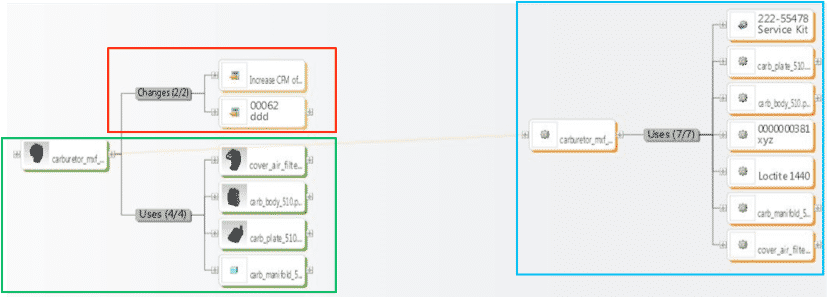
2ndexample shows an EBoM, SBoM (Service Kit in this example), with a saleable end item service kit, as well as components for service or manufacturing BoMs. It also shows Changes, these can also be created, edited, routed, approved or rejected, and even include the SBoM if need be.
Please connect with EAC to learn more, to discover your company’s transformation opportunities with an assessment, maybe see a demo, or attend a webinar. The goal is to help your company transform how you design, manufacture, connect to and service your products.
Here’s why engineering processes affect services and why streamlining information could solve the whole problem.
The Problem: Lack of Communication
Let’s be honest, engineering and manufacturing departments do not always communicate product changes to service. This is just the start of how your engineering processes affect services.
The Result: High Costs
When technicians reference outdated product information and arrive with incorrect parts, this leads to longer service visits, extraneous costs, longer downtime, and lowered customer satisfaction.
The Solution: Streamlining Information
Streamline the way you service teams access and use product information. The best way to accomplish this involves accurately transforming eBOMs (engineering bill of materials) to sBOMs (service bill of materials) and maintaining the fidelity of that information after engineering changes.
It’s time to stop letting your engineering processes affect services.
Take full advantage of the product data your organization has already created.
Structure service manuals and part information based on how a specific product is configured and serviced. Reuse engineering and manufacturing data in the service environment. Provide configuration-specific information to service technicians. Create a single point of access for your service content. Avoid text – use and repurpose graphics, animations, and CAD information when possible. And link service information to engineering information so changes propagate.
Next: Identify Your Service Needs
Identify what should go in your sBOM to ensure your sBOMs meet the needs of the service department. Examples might include what is serviceable versus what is replaceable, the status of a part, the components, models, grouped items, and more.
The Goal: Transforming Your Services
Remember: the ultimate goal is to make your customers happy. As a result of combining best practices with the right technology to support service and parts information management and publication you will see a higher customer satisfaction, improved technician effectiveness, improved brand reputation, higher profitability (due to lower revenue and service cost), time savings, and higher revenue (from repeat business and customer loyalty).
We have a team of technical communications specialists that would love to talk with you about your current state and current initiatives.
