
Manufacturers always try to find a ways to streamline processes and ‘do more with less.’ It drives success in a world full of competition. One way organizations do this is by reducing process complexity with powerful product life cycle management (PLM) or change management software. Connecting your team directly to live operational data increases efficiency in all departments and allows your organization to save money and manufacture products faster.
EAC Product Development Solutions has partnered with PTC, the world’s product development technology leader, to bring organizations the products and services that they need to succeed in their industry. As a PTC Solutions Provider, we provide the maintenance, support, configuration, and training you need to implement change management software as easily as possible.
PTC Windchill Data Management
If you’re looking to do things like keeping better track of files, create and store Bill of Materials (BoMs), put CAD models and drawings in one place, eliminate the risk of two individuals working on a file at the same time, or secure your data without burdening IT – you’re looking for PTC Windchill.
PTC software – specifically Windchill – is a complete PLM solution that provides capabilities such as:
- Bill of Materials (BoM) Management (EBoM, SBoM, MBoM)
- Configuration and Change Management
- Requirements Capture Management
- Early insight into product quality, reliability, and risk
- Efficiently making product variations with a structured platform
- Product Data Management
- Collaboration across all departments with accurate, up-to-date information
- Seamless software integration and defining standards
PTC Windchill is a PLM solution that provides a smooth transition from design to manufacturing with universal access to all critical product data information so that the process isn’t fatigued with delays.
PTC Windchill, Change Management, eBoM Case Study
ALM Positioners, a leading manufacturer of positioner lifts located in Rock Island Illinois, needed PTC Windchill. The company offers unique, customizable weldments and assemblies that require a lot of CAD models and other product information from engineering before manufacturing even begins. Due to extensive product customization and configuration depending on the needs of their customers, ALM needed a better solution to manage product data. They were drowning in paper files – a lot of which had outdated information.
EAC’s implementation team helped ALM Positioners transition to a digital workflow using PTC’s Windchill software. Windchill helped ALM save up to 4 hours per project by integrating EBoMs and MBoMs into their ERP system.
Watch the ALM Case Study on PTC Windchill to see how it has consistently proven to be a leader in the industry and outperformed competitors when it came to product lifecycle management.
Evolving your BoM strategy, tools, and abilities. “EBoM vs. MBoM” transforms into “EBoM integrates with MBoM.” This integration includes associativity to one another, time saving tools, elimination of error prone manual steps & more.
Imagine eliminating the common disjointed processes, additional time, and error prone manual steps involved in the creation of downstream BoMs from Engineering into Manufacturing, Production and Service management.
Concepts & examples such as Manufacturing Bill of Materials (MBoM) are shown below, all under one system, integrated & associated, and created with a single click. Then they’re easily edited to meet downstream BoM needs.
BoM creation can be streamlined & improved by associatively creating downstream BoMs (S or M or other) and eventually, connecting them to your ERP system. For now, we’ll focus on the first step of this business transformation concept; the creation of the second, or downstream M or SBoM, starting with a simple EBoM example, created in minutes, and easily viewed & tracked.
Who should be involved in this topic at your company? Ideally, your Configuration Manager role should be leading or heavily involved in this process.
The starting point & tool is PTCs Windchill and your willingness to change & improve.
Once your CAD data is ready to check into Windchill, there is an option (check box) to auto-associate the EBoM to a downstream BoM such as an MBoM. It is a 1:1 relationship for starters. Options can branch out from here into many CM (Configuration Management) directions. Such as multi-level BoM management, uses, visualization and more.
Once created, you can manipulate & edit the default 1:1 downstream BoM to your needs; adding bulk items, manufacturing specific sub assemblies, (build throughs) even new service end items. You can also flatten out an EBoM to meet assembly or production needs. BoM items such as adhesive, lubricant, paint or coatings, packaging items, all things that typically are not on an EBoM, can and do belong on the M or SBoM.
If this fits your company’s needs? consider using Windchill’s auto-associate feature.
This article covers a couple examples. If this is not deep enough…here are even more tools to consider. Topics such as creating associated manufacturing instructions, work instructions, work plans and more. Change Management is shown as reference only, it is an optional element of Windchill for another blog.
There are many options to this topic, these are common examples that fit a lot of needs and is considered a starting point.
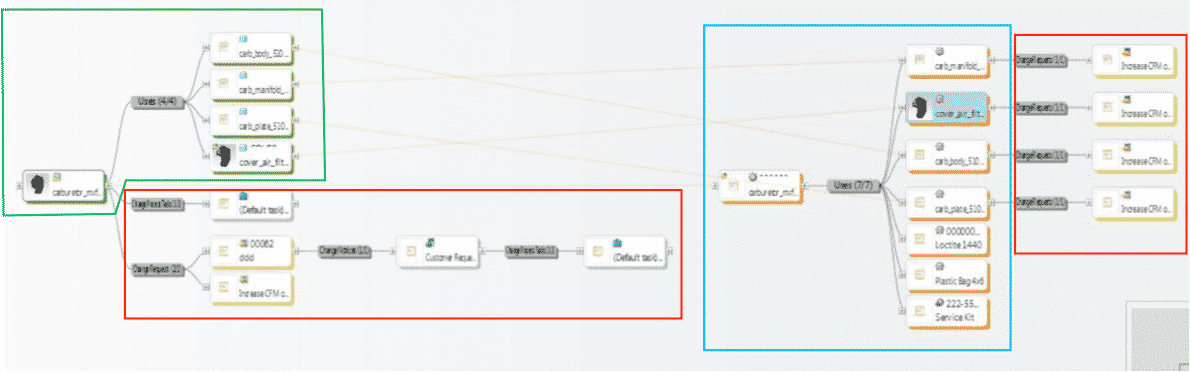
1st example shows all BoM & change components all connected in one system vs. manually done in silo fashion, which is industry’s most common method today. These examples are shown in PTCs Windchill reference viewer tool, which ties all related objects into view for easy visibility with just a few clicks.
- 1. EBoM structure (highlighted in green)
- 2. Change requests, notices and tasks (highlighted in red)
- 3. MBoM structure (highlighted in blue) with their own, or connected Change Management Requests, Notices & Tasks
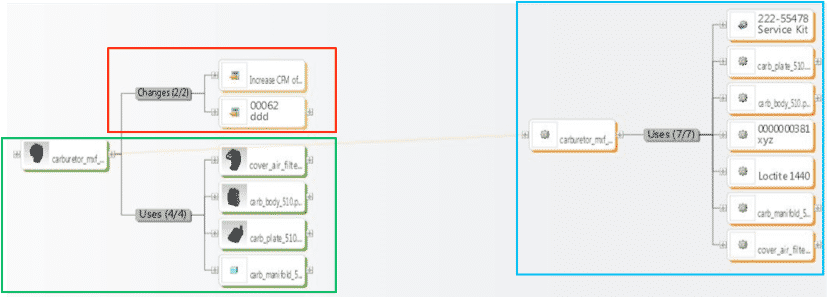
2ndexample shows an EBoM, SBoM (Service Kit in this example), with a saleable end item service kit, as well as components for service or manufacturing BoMs. It also shows Changes, these can also be created, edited, routed, approved or rejected, and even include the SBoM if need be.
Please connect with EAC to learn more, to discover your company’s transformation opportunities with an assessment, maybe see a demo, or attend a webinar. The goal is to help your company transform how you design, manufacture, connect to and service your products.
