Evolving your BoM strategy, tools, and abilities. “EBoM vs. MBoM” transforms into “EBoM integrates with MBoM.” This integration includes associativity to one another, time saving tools, elimination of error prone manual steps & more.
Imagine eliminating the common disjointed processes, additional time, and error prone manual steps involved in the creation of downstream BoMs from Engineering into Manufacturing, Production and Service management.
Concepts & examples such as Manufacturing Bill of Materials (MBoM) are shown below, all under one system, integrated & associated, and created with a single click. Then they’re easily edited to meet downstream BoM needs.
BoM creation can be streamlined & improved by associatively creating downstream BoMs (S or M or other) and eventually, connecting them to your ERP system. For now, we’ll focus on the first step of this business transformation concept; the creation of the second, or downstream M or SBoM, starting with a simple EBoM example, created in minutes, and easily viewed & tracked.
Who should be involved in this topic at your company? Ideally, your Configuration Manager role should be leading or heavily involved in this process.
The starting point & tool is PTCs Windchill and your willingness to change & improve.
Once your CAD data is ready to check into Windchill, there is an option (check box) to auto-associate the EBoM to a downstream BoM such as an MBoM. It is a 1:1 relationship for starters. Options can branch out from here into many CM (Configuration Management) directions. Such as multi-level BoM management, uses, visualization and more.
Once created, you can manipulate & edit the default 1:1 downstream BoM to your needs; adding bulk items, manufacturing specific sub assemblies, (build throughs) even new service end items. You can also flatten out an EBoM to meet assembly or production needs. BoM items such as adhesive, lubricant, paint or coatings, packaging items, all things that typically are not on an EBoM, can and do belong on the M or SBoM.
If this fits your company’s needs? consider using Windchill’s auto-associate feature.
This article covers a couple examples. If this is not deep enough…here are even more tools to consider. Topics such as creating associated manufacturing instructions, work instructions, work plans and more. Change Management is shown as reference only, it is an optional element of Windchill for another blog.
There are many options to this topic, these are common examples that fit a lot of needs and is considered a starting point.
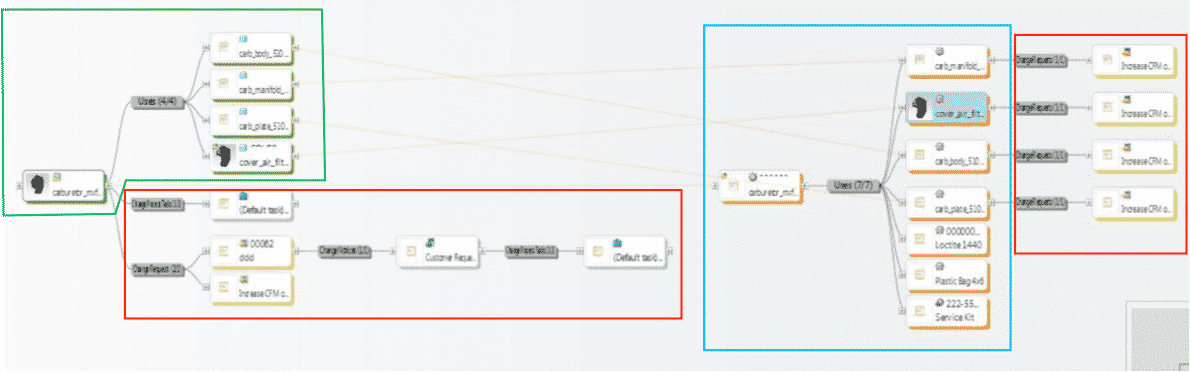
1st example shows all BoM & change components all connected in one system vs. manually done in silo fashion, which is industry’s most common method today. These examples are shown in PTCs Windchill reference viewer tool, which ties all related objects into view for easy visibility with just a few clicks.
- 1. EBoM structure (highlighted in green)
- 2. Change requests, notices and tasks (highlighted in red)
- 3. MBoM structure (highlighted in blue) with their own, or connected Change Management Requests, Notices & Tasks
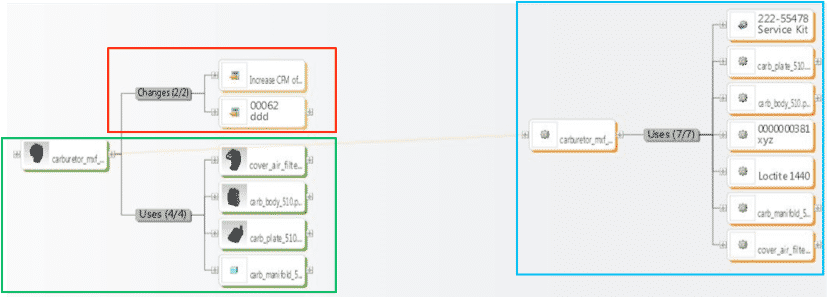
2ndexample shows an EBoM, SBoM (Service Kit in this example), with a saleable end item service kit, as well as components for service or manufacturing BoMs. It also shows Changes, these can also be created, edited, routed, approved or rejected, and even include the SBoM if need be.
Please connect with EAC to learn more, to discover your company’s transformation opportunities with an assessment, maybe see a demo, or attend a webinar. The goal is to help your company transform how you design, manufacture, connect to and service your products.
We have had a long-standing relationship with a local manufacturing company over the years and are proud to share their success story with the rest of the product development world. PTC Windchill, PTC’s PLM solution, helps Virnig Manufacturing go paperless, streamline operations, and save over 325 hours per year.
What stands out about this case is the fact that the company was able to reduce or eliminate paper trails in all departments in less than one month thanks to a single tool. Why is going paperless such a big deal? Companies go out of their way to eliminate unnecessary processes in order to operate at a maximum efficiency. Most companies will invest in a Product Lifecycle Management (PLM) system to streamline the flow of product data through the organization, improve quality and efficiency, and better manage their business. PLM systems organize a company’s product data in one place so there are no obstacles between departments and accurate product, manufacturing, and service information.
Virnig Manufacturing has been designing and producing skid steer attachments for over 27 years. Due to an expanding workforce over the years, Virnig faced a new challenge of organizing the over-flowing piles of critical work documents. Darin Virnig, Engineering and Production Manager, and his team kept all work documents in large red binders throughout the facility and in each department. Due to the recent growth and expansion of the business, Darin needed to find a file management solution.
Download the case study to see how Virnig Manufacturing is leveraging a right-sized PLM solution — PTC Windchill — to overcome some of their biggest challenges.
If you don’t have PLM in your organization at all, reach out to us. We have a team of experts ready to answer any questions you may have. They would love understand your situation and the benefits of implementing PLM in your organization.
By the time you have invested in a Product Lifecycle Management (PLM) system, you are ready to overcome the inefficiencies of your current processes, and reap the benefits of improved business operations and profits. The key to maximizing those benefits lies only partially in the program itself. The other part rests firmly in the hands of those who will implement the new program. Making sure your employees know how to use the system to its best advantage will put your company well on its way to achieving its goals.
Employee Training as an Investment
Change, by itself, is often frustrating. Employees using one system for years grow comfortable even with features that do not operate as intended, sometimes designing elaborate work-arounds just to get the job done. Suddenly presented with a new PLM system, these employees may dread the unknown and cling to a subpar system for its familiarity alone. Getting employees involved with the new PLM system early in the process when bringing a new system on board is important in maximizing its efficient use in your company.
When introducing your new system, start with a reminder of what you learned from your employees about the old system: what problems they were having, where there were inefficiencies or delays, and what impact that had on their ability to get their work done. Then invite them to see how the new system will help alleviate those issues. Once they see how they will benefit from your new program, they will be ready for their next step: learning how to use it.
Certified Training Opportunities
Training is available for product design and management programs including Windchill, Creo, Arbortext and more. Options include public or group training events, private training sessions and remote or eLearning opportunities. Web modules offer further employee development.
Whether they breeze through free tutorials and are completely comfortable with the new program, or whether they require more hands-on training, each member of your team will need full access to instruction that will make them experts in using the new PLM program.
You should also consider having a system available for experimentation. Each employee should be able to get the feel for how Creo, other CAD platforms, Microsoft Word, and company procedures work within a system like Windchill. Finally, get feedback from your teams to understand how they feel and what additional assistance they want. Knowing that you want to give them all the tools possible to make the new program work will remind them that they are important players in helping your company achieve its goals.
How Training Your Employees Helps Your Business
Investing in your employees and their training is time well invested. Employees who are happy in their positions and feel appreciated are likely to stay at your company and take it to a higher level of productivity. Employees frustrated by not understanding a new system, on the other hand, may look for greener pastures. Implemented correctly, a new system can enhance not only work efficiency but employee satisfaction as well.
The highest quality, most advanced PLM products on the market are only as good as the employees that use them. Remember to invest in your employees as much as you invest in your technologies. And when you feel thankful for that new program and the efficiencies it has brought, this time of year is a great time to show thanks to your team for ensuring your business success.
