
Making and extending access to product data (also known as data accessibility) is exactly what can put you ahead, especially if your organization has anything to do with product development.
This article explains how to make product data accessible, as well as why product data access is a trend that many organizations are beginning to pursue.
Product data is vital to organizational success
In business and engineering, product development refers to bringing new and existing products to market. During this process, your product data is everything.
Your organization’s product data likely includes computer-aided design (CAD) data, 3D models, parts information, standardized work instructions, product requirements, notes, documents, and more.
This is why your organization’s product development success starts with… you know it… product data.
The reality is, the product data that may only be visible to engineering or management teams is exactly what your entire organization could leverage to make better-informed decisions.
Product data is vital to organizational success because it helps identify business opportunities, predict future trends, and most importantly it is exactly what allows you to generate more revenue.
Why is data accessibility important?
Data-driven business decisions make or break companies. This is exactly why your product data should be accessible to anyone within your organization who needs it.
People across multiple departments often need to input data into business systems, especially in larger organizations.
If different employees throughout your organization input slightly different information, use non-compatible formats or simply don’t have access to each other’s data – confusion and miscommunication can occur.
These situations lead to mistakes, unnecessary costs, and lost revenue. All of which (I’m going to assume) your business is trying to avoid.
There are many reasons why access to data is important, but let’s address data access methods and tools your organization can use to help extend and make your product data accessible.
The first step to making product data accessible: System integration. System integration is an ever-popular topic among the IT savvy.
Integrated systems streamline processes, increase efficiency and productivity, reduce costs, and reduce manual entry errors. This is why organizations take steps to integrate business and enterprise systems used throughout their operations.
Integrating your business systems helps keep everyone on the same page by ensuring all staff has access to the same data.
This is especially important when tracking product changes, and I’ll explain exactly why.
Let’s assume an engineer needs to make a last-minute one design adjustment to a product. This is a situation when it is crucial to inform affected departments and stakeholders of product changes as soon as possible.
When system integrations and PLM/ERP tools are in place, everyone throughout your organization (who would need access to specific product data) can access up-to-date information!
Not only does this keep people up-to-date and informed, but it also allows people throughout an organization to compare and contrast the evolution of your products.
Why is that so important?
A cross-functional team’s ability to evaluate the history of product changes through the lens of each individual’s respective discipline will provide a better idea of the impact of product and process changes over time.
By encouraging information-sharing and communication between departments, system integration can inspire collaboration between departments and lead to unexpected business improvements.
When one department gains access to information they didn’t have before, it can help them understand the role in the company better as well as the overall operation of the business.
This knowledge can help them improve performance and productivity, as well as, allow them to make better, more informed decisions.
Recognizing & responding to multiple data user’s product information needs
Although product data management tools (such as PTC Windchill) help organization’s collect and manage data, many enterprise solutions (such as product lifecycle management systems) fail to build user interfaces that non-technical staff can actually understand.
PLM systems can quickly become too complex for many roles across an organization. This can make it hard for users to navigate the system, find information, and ensure they’re getting the right information.
Oftentimes the sole users of PLM enterprise systems tend to be engineers and product designers who create the information. This means other roles are requesting information from the authors, whether they are designers or engineers.
When this happens, users lose time waiting for the person who created the information, and they take time from the designers and engineers that should be focused on designing and developing products.
The solution: System integration that is focused on data visibility and data accessibility
By integrating your enterprise systems with a focus on data visibility and data accessibility, your organization ultimately supports communication and collaboration across the entire enterprise and value chain.
For instance, product data management tools (such as PLM applications or plugins) can collect and transform your product data. These same product data access tools can also provide a data output with meaningful content, assisting any role (such as accounting, purchasing marketing, etc.) to make smarter and faster decisions which can directly impact your bottom line.
An easy solution to extend product data access
Our company, EAC Product Development Solutions, designed an easy solution to help organizations (like yours) easily extend access to accurate product data.
Our solution is our EAC Productivity Apps.

Our PLM EAC Productivity Applications deliver role-based data mash-ups, that provide just the type of product information that is needed by a particular role.
Our PLM plugin technology works in the back-end to bring together product information stored in multiple enterprise systems (such as ERP, ALM, PLM, QMS, etc) to deliver product data to users in a way that can be easily consumed.
This enables an entire enterprise to get valuable product data and information in just the way that they want it when they need it.
Our Productivity Applications also eliminate time wasted waiting for authors to collect and redistribute product information.
Our EAC Productivity Applications help deliver on the promise of Product Lifecycle Management.
The future of digital transformation is happening now, and it is driving the future of all industries. This article highlights just about everything you need to know about the impacts and trends involving digital transformation.
No matter where your company resides on its digital journey – or even if you have yet to start with digital transformation, this article is just for you.
What is Digital Transformation?
Digital transformation refers to the concept of applying innovative uses of digital technology to solve traditional business problems.
For example, in a narrower sense digital transformation might refer to a simple concept such as ‘going paperless’. Yet, on a larger scale, it might refer to ‘achieving digital business maturity’.
Digital solutions not only enable organizations to achieve new levels of efficiency through automation, but they also open doors for creativity and innovation (rather than simply enhancing and supporting traditional methods).
Although applying the use of digital technology to solve traditional problems can offer numerous business advantages, many organizations have yet to begin the journey with digital transformation.
Digital Innovation: Where to Start?
With numerous applications, methods, and strategies, it can be difficult to know where to even start with digital transformation!
If this is the case with your organization, – don’t worry, you’re not alone.
According to a research study performed by Accenture and the World Economic Forum, 80% of executives stated they were completely convinced ‘digital’ advancements would fundamentally change and transform their industry within the next 5 years!
That’s right. Eighty percent! … And they’re not wrong at all!
In fact, digital technology has not only already begun to transform industries, but it has also started to transform the way the world experiences products. Despite the ability to recognize the effects that digital processes will bring, only 17% of the studied executives stated they had a strategy in place to address the challenge of digital transformation.
This left a shocking 87% to admit they had no current digital strategy in place whatsoever! This is exactly why, if you have not yet started your digital transformation journey, it’s important to realize A) It’s not too late and B) You are not alone. There is no better time to start than now!
Organizations are realizing the significant impacts that the digital transformation era brings and how it’s going to drastically change just about everything when it comes to the way we do business.
The Impact of Digital Transformation
The process of digital transformation is creating entirely new ways of doing business. It has begun to create new experiences for customers while adding entirely redefined value propositions for mature product segments.
This era of digital transformation has started to impact and define what products are and what they mean to businesses and consumers.
Product perceptions are changing
Digital trends have also started to influence purchase decisions and sales processes. As the digital world has advanced, the average consumer is making purchase decisions with a Product as a Service (PaaS) mindset.
This means the rise of digital transformation has driven consumers to be sold by the outcome of the product – the recurring value. Manufacturers can address this shift in the market demand archetype by embracing three technology categories – Internet of Things (IoT), analytics, and mobile.
The future and advancement of technology is happening now
Established power plays and industry lines are beginning to blur. You cannot wait until some time in the near future to start your digital journey.
If your organization is going to succeed going forward, you won’t want to be left behind in this new industrial revolution, or you will fail.
Whether or not you’ve noticed if your industry has been affected yet, the key message is the effect of these disruptive technologies doesn’t discriminate one sector or industry. Every industry will see a major impact due to these digital technology advancements… And it is happening right now.
‘Business as usual’ is no longer an option. Organizations must adapt in order to survive.
The future of Digital Transformation: Smart, Connected Products
Digital transformation is reinventing products. Products from cars, to jet engines, to pumps, to heavy equipment, to medication, and more!
Machines, assets, and devices are starting to communicate, learn, and react to newly accessible context as they exchange and leverage data from sensors.
We are talking about the area of ‘living products’ – meaning transformative products that are responsive, collaborative, reactive, and responsible. Whether products are B2B or B2C, there will be a totally different process in the way we think about how our customers are using our products in the near future.
The future is now. Don’t let the opportunity slip away.
The first step in your digital transformation journey should be a strategic one. Understand where you are, where you want to be according to your current framework or understanding, and where you’d like to be as you embrace future technology and evolve with changing markets and new opportunities.
EAC Product Development Solutions would like to help you begin your transformation. We provide the people, technology, and services to make any transformation successful. The first step should be a Product Development System Assessment (PDSA). This will help you understand the opportunity that lies in front of you. Request more information on the PDSA today and start taking your digital transformation seriously.
Here’s why every manufacturing company should be considering product lifecycle management applications.
Expand PLM software usage throughout your enterprise with PLM apps
Let’s face it, no company uses a single product data management system (PDM) or a Product Lifecycle Management (PLM) system for ALL of its organization’s needs.
Your organization likely uses an abundance of different technology software to collect and store data. These technologies can include customer relationship management (CRM) systems, quality management system (QMS) software, enterprise relationship planning (ERP) systems, application lifecycle management (ALM) systems, and so many more.
If your organization currently uses a PLM system, odds are you most likely paid a pretty penny for it. So why not make the most of that product lifecycle system investment and use your system’s complete functionality?!
Product lifecycle applications support, enable, and enhance the value and footprint of PLM software. PLM Apps go a long away to assist and ensure consistent access to up-to-date product data. They can help expand controlled access to valuable content and give functional groups a single simplified view of files, data, and content all within a single browser-accessible screen.
You’re going to want to invest in these kinds of advanced technology solutions that simplify data gathering processes and expand the value of your PLM investment. PLM apps are meant to help you find data easier which reduces user frustration and helps take productivity to new levels within your organization.
PLM applications, also referred to as PLM system plugins, deliver on the dreams of many organizations. They are a simple solution that drastically increases enterprise PLM usage.
PLM apps integrate siloed data from disparate systems
With the use of multiple complex enterprise systems, your organization’s data is most likely held captive in siloed systems. Many PLM applications help connect these disjointed enterprise systems using common application programming interface (API) connection abilities.
PLM apps simply pull data from other enterprise systems into a new user-interface through API integrations. They don’t rely on interface features from other enterprise platforms or systems (besides the data and information they extract), therefore, they are less likely to be affected by a new release of the underlying enterprise systems!
PLM apps simplify searches for the occasional PLM software user
PLM apps change the user interface (UI) and user experience (UX) of your PLM system so that it’s easier to use. This can be useful for occasional or novice users who can feel overwhelmed by the complexity of their PLM system compared to those that use their PLM system on a daily basis.
PLM applications offer user-friendly interfaces that simplify the complexity of PLM systems and make it easier to search, find, locate, and understand product information. In fact, many of these tools even allow organizations to adjust settings for specific users (such as purchasing, marketing, accounting, etc.) so they can access the direct information they need.
PLM apps Many customers we work with use complex product lifecycle management systems such as PTC Windchill or Siemens Teamcenter. Due to the robust capabilities of these enterprise systems (and other PLM systems), many users find product data hard to navigate – especially if they aren’t daily users within these systems.
PLM apps speed up product development processes by providing users with complete access to real-time complex enterprise data.
Product lifecycle applications really do make PLM easier – see it for yourself by watching this short PLM applications video.
Customize PLM apps without disrupting your PLM software
PLM applications and system plugins offer simple and easy ways to customize enterprise product data systems. A PLM Administrator can customize the apps to conform to their company’s goals and prioritization of tasks without disrupting the PLM software itself.
Time after time, we see organizations add PLM customizations to their mainframe PLM software, only to wind up facing dozens of challenges as new system software versions get released. Because PLM apps are an extension of PLM software systems, they are minimally affected by upgraded software versions and updates (if at all).
PLM apps provide organizations with the ability to easily custom tailor simplified product lifecycle management interfaces or mashups. This functionality provides additional value and integration capabilities with other enterprise systems.
PLM Applications offer a brand-new UI for your intricate product data management system; enabling a fresh and simple user experience. They also have started to help organizations solve problems easier and faster with direct, accessible, and instantaneous insights from data.
Your systems are only as good as how you use them. If employees struggle to navigate your product lifecycle system interface, PLM apps are definitely something you should be looking into!
How PLM apps drive flexibility within your organization
PLM applications provide access to PLM information to employees outside of engineering such as marketing, sales, finances, and procurement.
Access to PLM system data provides another way for teams to identify the broad scale of their day to day activities and information. This can help teams understand and prioritize tasks to be more efficient and productive.
This flexibility allows teams to work the way they want. By enhancing a complex system and tailoring each end-user experience, it’s easy to see how these PLM system plug-ins can drastically improve productivity and drive value across an organization.
What is better than providing every department with product information that they want and need to do their job?!
Want to learn more about PLM Applications and how they could pair up with your current enterprise systems? Let’s have the conversation!
Data Visualization and system integration tools are shaping the future of business and I am going to explain exactly why.
First, it is essential that you understand the impacts of technology and data today.
The impacts of big data
Humans collectively produce approximately 2.5 quintillion bytes of data each day and this number is only increasing with the acceleration of the Internet of Things (IoT). These already astonishing statistics are growing at an ever-increasing rate as our world becomes even more digitized and data-centric.
Due to this overwhelming growth, businesses have begun facing challenges with data capture, analysis, distribution, storage, and visualization. In fact, big data has started to become so large and so complex that businesses are even finding traditional data processing techniques to be inadequate. This is exactly why system integration and business intelligence software have become essential components for successful business data management strategies.
System integration and system integration tools
Enterprise application integration software combine components of sub-systems together into one centralized system. Essentially, system integration applications ensure all business systems function together as one.
For instance, integration applications (such as EAC Productivity Apps) connect existing systems and enable seamless data to flow from various systems into role-based dashboards or “mashups.”
By using applications that integrate all of your business systems, your organization opens up a clear, efficient path, for information to travel from one application or system to another. The process of linking together different computing systems and software applications opens up an organization’s ability to easily collect, aggregate, and share data.
Business intelligence
The trend towards business intelligence (BI) has driven many companies to evaluate technology-driven processes for analyzing data and presenting actionable information.
Common functions of business intelligence technologies include reporting, analytics, data mining, process mining, business performance management, benchmarking, predictive analytics and prescriptive analytics.
BI technologies can handle large amounts of structured and sometimes unstructured data to help
System integration, Bi, and data visualization
Tools and applications that integrate business systems incorporate oftentimes incorporate data visualizations, also known as data dashboards.
Data visualizations deliver graphical representations of data or information, often in the form of a chart, diagram, picture, or any other visual illustration. Visual representations of data and information help humans understand the significance of data by transforming it into information placing it in a visual context.
Human visual processing is efficient in detecting changes and making comparisons between quantities, sizes, shapes, and variations in lightness. When properties of symbolic data are mapped to visual properties, humans can browse through large amounts of data efficiently.
If considering the way the human brain processes information, using charts or graphs to visualize large amounts of complex data is much easier than attempting to analyze multiple different spreadsheets or reports. By using visual elements like charts, graphs, and maps, data visualization tools provide an accessible way to see and understand trends, outliers, and patterns in data.
The impacts of data visualization
Data visualization enables executives, managers, and other corporate end users, to easily digest huge amounts of data by displaying visuals.
These data visuals encourage decision makers to compare sizeable amounts of information while data is being revealed beneath several levels of detail. This encourages the natural eye to compare and contrast different pieces of data, that may have otherwise been lost within reports.
System integration tools that collect data from internal and external systems and aggregate it into data dashboards, enable organizations to reason quantitative information. This helps executives, managers, and other corporate end users to better understand trends, patterns, and possible correlations. Data visualizations can also allow decision makers to make better business decisions.
Visual data representations of information assist decision makers in the absorption of information in new and more constructive ways. They encourage a user to think about the substance of the data rather than the methodology.
With the ability to manipulate and interact directly with data, organizations visualize relationships and pattern between operational and business activities. This allows them to identify and act on emerging trends faster, as well as, identify areas that need attention or improvement.
By using system integration business intelligence tools and applications, organizations can collect data from internal and external systems, prepare it for analysis, develop and run queries against that data, and create reports, dashboards and data visualizations to make the analytical results available to corporate decision-makers, as well as operational workers.
Think data visualization and system integration could be what your organization needs?
We offer EAC Productivity Apps as
These days product data is everywhere. Everyone seems to collect it, have a lot of it, but the question remains; how exactly can you ensure your organization’s product data is being put to good use?
It’s time to take your product development one step further by providing role-based data access, connecting your enterprise systems, and learning how to make the most of your product data. I am going to explain exactly how easy that is to do.
The current state of product data
Companies today have many different roles that require access to product data. This may include people outside of the typical roles of which you may be thinking.
Departments such as engineering, manufacturing, that’s a given, but expand your thinking to include operations, purchasing, and marketing. They all need data access in order to edit and consume information. Think about sourcing…I’ll stop there, but you get the idea.
Let’s focus on the engineering department for a moment.
People could be involved from the mechanical side, the electrical side, or even a quality standpoint. Beyond that, people need to either contribute or consume information that could include manufacturing, service, sales, and more.
Product data game-changers
Product data silos limit productivity – PTC & EAC have the answer.
PTC ThingWorx Navigate was designed to address data accessibility problems by providing simple role-based apps that deliver just the right information to different groups (or departments) in the way that they need
When non-engineering colleagues need access to vital information, they typically interrupt an engineer or designer with a request. ThingWorx Navigate eliminates that distraction and “double-billing.” Through role or task-based self-service applications, data can be securely shared with a team. That way non-expert teams can use a simplified user interface to access the product data they need, right when they need it.
To help accelerate product development processes and take product data even further, our company (EAC Product Development Solutions) has also created what we call EAC Productivity Apps that work alongside ThingWorx Navigate apps.
So what’s the difference between ThingWorx, ThingWorx Navigate and our EAC Productivity apps?
This is a great question- I am going to try and paint the picture for you.
First, it’s important that you understand what ThingWorx is and how it is different from ThingWorx Navigate.
ThingWorx is the proper name of PTC’s Internet of Things (IoT) platform comprised of 5 components; foundation, industrial connectivity, analytics, studio,
The foundation component is the heart of the ThingWorx loT platform used to make connections to ‘things’ which could be machines, products or software systems or pretty much anything with an IP address and a communications interface.
User interfaces to the data coming from these connections are displayed on websites called ‘mashups,’ created with ThingWorx foundation. You might know these perhaps as ‘data mashups’ or possibly as ‘data dashboards’. Simply put, Thingworx is the IoT platform that makes everything possible. (Here’s exactly what makes Thingworx the leading technology for industrial IoT)
Then you have ThingWorx Navigate.
ThingWorx Navigate is the proper name of PTC’s applications that
ThingWorx Navigate Apps use a Windchill (PLM) connector to extract product data for presentation to Windchill Product Lifecycle Management users.
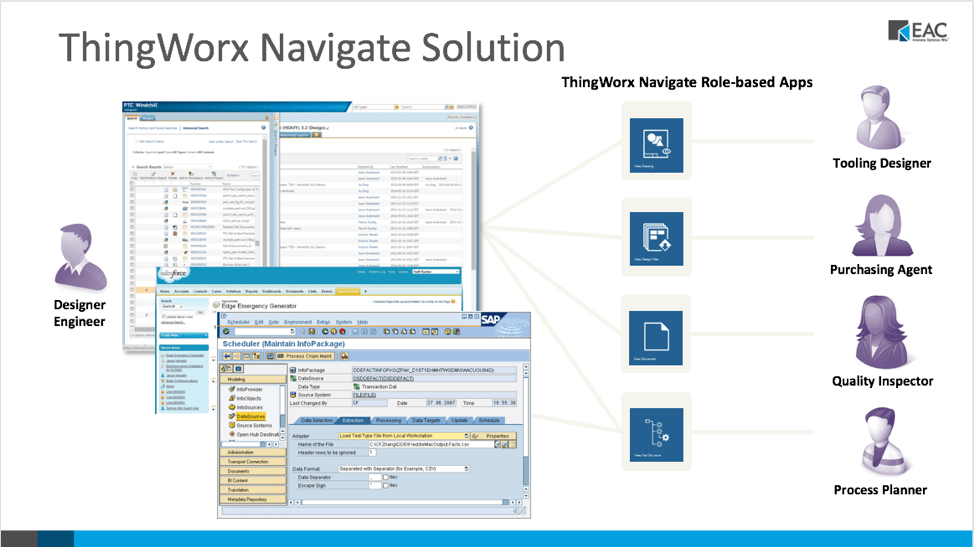
Fundamentally, ThingWorx Navigate Apps are all simply data and product information mashups created with ThingWorx. With ThingWorx Navigate you receive out-of-the-box apps that are instantly ready to be used with your PLM system. The idea behind these product lifecycle management apps is to ensure users can capture the complete functionality of their PLM (product lifecycle management) investment.
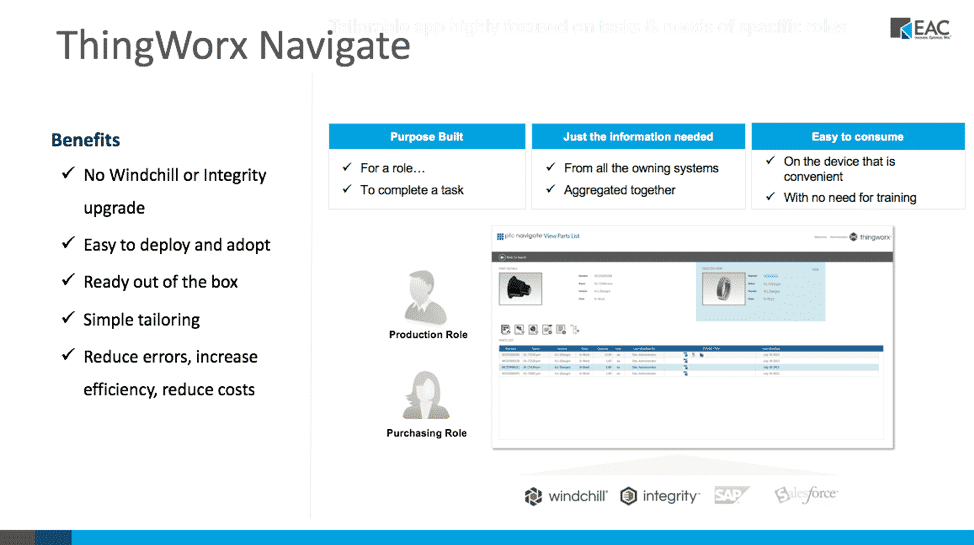
ThingWorx Navigate PLM Apps include:
View Design Files – A design file would be a format of a file that isn’t the native CAD format. This could be a staph or Induce or perhaps a 3D PDF
View Drawing – Allows you to look at just drawings. This application pulls drawings from your Windchill PLM system.
View Part Properties – This feature allows you to look at part properties- as if you were hitting the ‘Information button’ next to a file.
View Parts List – Allows you to look at bills of Materials (BOMs)
View Part Structure– With the View Part Structure App, ThingWorx is actually going into PDMLink and showing different aspects of a specific part instead of different ways of going at it (such as having to open several different tabs to get information). Using this application, you can get all your information together on one page. This feature also includes capabilities that cross-highlight part structures within your product. For instance, you could select a component and it would highlight that part and create a hyperlink that allows you to directly look at that specific part. This feature essentially creates a mash-up that takes information from different places inside of Windchill PDMLink and brings them together putting them on one screen, allowing you to have all your information at your fingertips.
View Document & View Document Structure
PLM Applications created by EAC
Our EAC Productivity Apps (also known as product lifecycle applications)
They allow departments to access content and perform common tasks through a very simple interface, versus having to use a complex product lifecycle management system (PLM) or Enterprise Resource Planning (ERP) system.
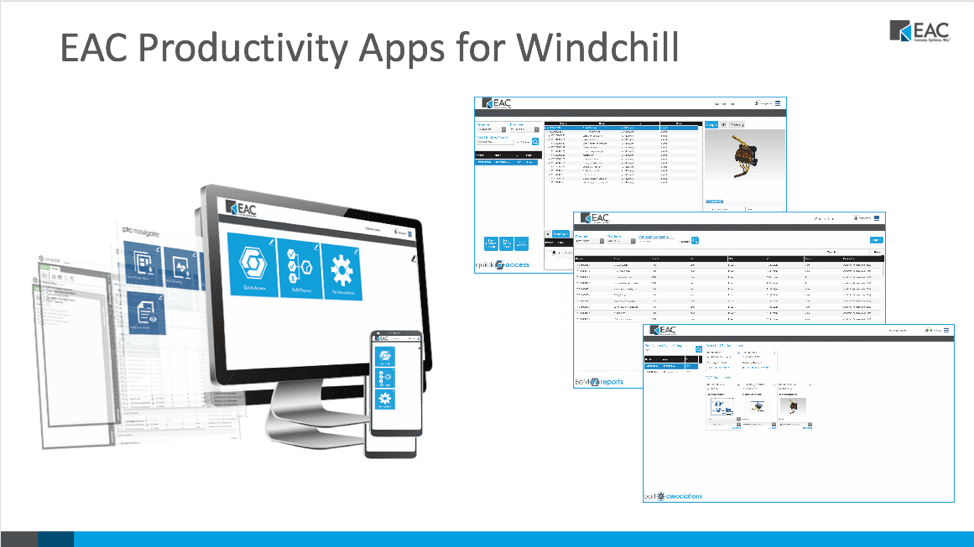
PTC Navigate Apps vs. EAC Productivity Apps
Our EAC Productivity Apps provide capabilities beyond that of the out of the box ThingWorx Navigate apps.
In short, ThingWorx Navigate applications allow you to securely access and present role-specific data from your Windchill system. They provide all of the power of a Product Lifecycle Management (PLM) system to someone who is not familiar with its ins-and-outs of product data management.
EAC Productivity Apps take it a step further by taking the underlying technology of ThingWorx Navigate, and the ability to get at the information in the PLM system and create even more complete applications that really give individuals instantaneous access to the information and product data they need to do their job. EAC’s PLM applications are created using PTC’s ThingWorx IoT platform, however, they can run independently of ThingWorx Navigate.
These apps are unique to EAC.
While built using the same ThingWorx foundation, ADK and [Windchill connector], they have their own look, feel and functionality. These mashups are packaged and sold together as a collection. EAC Productivity Apps created for Windchill promote user adoption and amplify the return on the investment you’ve made in your Windchill system, as well as extending role-based visibility into relevant product data and the impact PLM has on your organization.
Take your product data further with EAC Productivity Apps
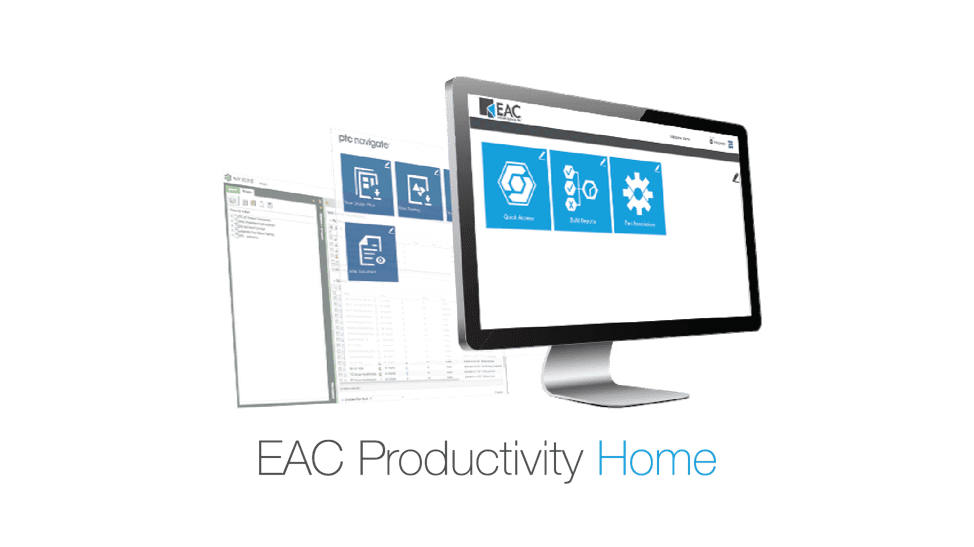
Every subscription of EAC Productivity Apps includes free access to EAC Productivity Home. EAC Productivity Home is a proprietary framework, or launcher, for ThingWorx Navigate applications.
It sits on top of Windchill and

The EAC Productivity App, Quick Search, provides a simple way for users to find content in Windchill. It removes the need for users to apply an understanding of how Windchill objects are related in order to find the information needed to do their job.
The Quick Search PLM application also allows users to search for components and retrieve information and file formats. For instance, if you were to grab a drive system and do a quick search, it’s going to find product information such as parts, EMP like documents, CAD files and more. See EAC Productivity Application Quick Search in action here.
You can also learn more about the Quick Search features in this brochure.

The Quick Access EAC Productivity Application streamlines access to critical and select data sets. Simplifies downstream users feeding critical quality information back to engineering with minimal effort.
This EAC Productivity App allows downstream users to feed critical quality information back to engineering with minimal effort. The simplified interface and consolidated task workflows help users easily submit new problem reports, new change requests, and new variances.
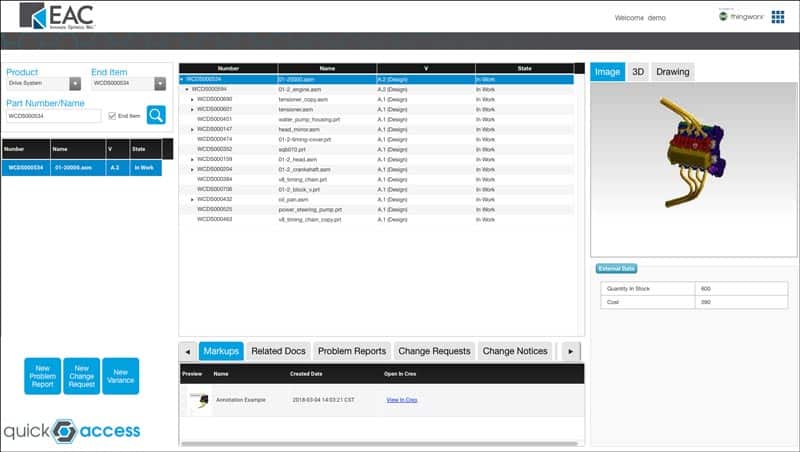
For instance, you could select a component (such as a product), pick its name (the end item number), search for it, and you would get straight to assemblies. With the use of Quick Access users can easily submit new problem reports, change requests, variances and more.
You can learn more about Quick Access features in this brochure.

The Part Associations EAC application provides a “shortcut” for non-CAD users to access critical files and documentation associated with designs like drawings, parts, assemblies, and other documents associated with CAD files and part data.
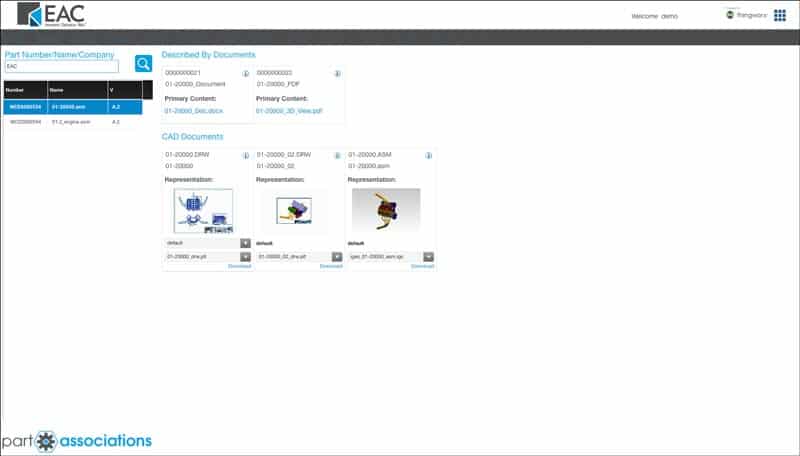
You can learn more about Part Association features in this brochure.

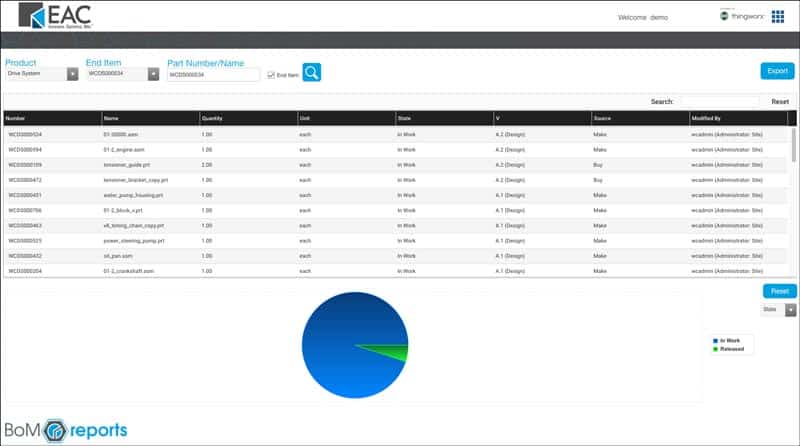
BoM Reports App provides a visual representation of cost
This EAC Productivity App allows users to quickly assess a Bill of Material and ensure projects stay on-time and on-track. The simplified view helps ensure products are built with the appropriate design iterations. With the use of BoM Reports users can easily see BoMs, lists of unreleased parts, parts that have been created or modified by specific users and more.
This app allows users to see the progress of a bill of materials, and apply filters to focus on parts that are not yet released. It is also useful for viewing all of the “make” parts or “buy” parts in a given BoM, or all parts created/modified by a particular user.
Get better access to your product data
See all the features of EAC P
Smart connected operations are transforming companies and changing the way we do business.
Imagine if your company was able to take advantage of data that revealed existing and future problems, and allowed your team to make drastic improvements by completing predictive maintenance and service.
Business decisions can no longer be reactive. You need to be proactive — Here’s how smart connected operations could ‘revolutionize’ the way you do business.
Smart connected operations help businesses make faster decisions
What helps a company make fast, highly informed decisions? Data.
Smart connected operations allow information to be collected from multiple sources, assets, facilities, and even vendors. This connectivity allows data to be collected and analyzed to inform decision-making and enable teams to make faster decisions.
Smart connected operations help businesses increase operational performance
Smart connected operations can help your business monitor and track asset viability, ultimately allowing your company to reduce downtime, improve design, and improve utilization.
Data from connected assets, in collaboration with other enterprise systems, can provide not previously possible visibility and automation across organizations.
For example, product data flowing through a CRM system can also be sent to billing or into a supply chain management system— helping to eliminate error-prone manual steps and providing new sales opportunities for things such as consumable replenishment or warranty renewals. (PTC)
Smart connected operations help businesses decrease lead time and increase product quality
The insight smart connected operations provide will help you improve and perfect your production processes.
By integrating smart technologies and processes, your organization can lower development costs, time-to-market, and improve your overall product quality.
Smart connected operations help businesses improve manufacturing responsiveness
A sensorized manufacturing floor let’s you monitor performance, in real-time, and provide valuable information to field service technicians and manufacturing floor managers.
Service responsiveness will be accelerated with remote monitoring, access, and complete management of your disparate systems through enabling smart connected operations within manufacturing.
Smart connected operations help businesses improve supply chain coordination
The new capabilities of smart, connected operations will alter every activity in the supply chain.
Your operational efficiency will increase exponentially if your organization reaps the benefits of integrating with other data, such as inventory locations, traffic patterns, commodity prices, and historical data repositories.
Smart connected operations help businesses reduce manufacturing IT costs
Smart connected operations use digital interfaces that make it easier and less expensive to track the production process. These interfaces are less costly to apply and easier to modify than physical system controls. By integrating smart connected operations, your company will increase operation mobility, which in turn can reduce your manufacturing IT costs.
The sensors in smart connected operations also identify a need for service before the machine or product fails. These data analytics will drive previously unattainable efficiency improvements by providing predictive maintenance analytics and higher productivity levels.
With the help of predictive analytics, smart connected operations help organizations anticipate problems and take early action.
For example, your industrial machines would be remotely monitored and adjusted by end users during and beyond operation hours. They could even begin to manage themselves leveraging machine learning and predictive analytic engines.
The bottom line is that smart connected operations have begun to change business models, organizational structure, and manufacturing system architecture.
The development and the deployment of smart connected operations will be incremental, but the opportunity is here today.
What are you waiting for? It’s time to start capturing the time, dollars, production, and quality that smart connected operations can provide.
