

Developing complex products in CAD (computer-aided design) with a distributed team can be a challenging task. However, with Creo Parametric’s Advanced Assembly Extension [AAX], managing distributed development becomes a seamless process even on a global scale.
This powerful extension facilitates and automates the exploration of product assembly variations and adds intelligence to your CAD design assembly so it reacts correctly in any situation.
Clearly Defining and Communicating Complex Design Intent
To kickstart any complex design project within CAD, it is vital to have a clearly defined source of design intent. This serves as the backbone of the development process and enables smooth collaboration among team members.
Furthermore, Creo Parametric AAX has tools for creating and managing space claims, assembly interfaces, and location points. These features help define design intent and make sharing information easy. With a clear and structured design intent, it becomes much easier for team members to understand their tasks and contribute effectively.

Distribution and Communication of Design Intent
Once the design intent is defined, the next crucial step is to distribute and communicate this intent to team members efficiently. Creo Parametric AAX allows team members to focus on their relevant tasks by providing options to copy relevant geometry or use published geometry in their subsystem. This ensures that each team member can work on what’s relevant to their task without any confusion or delays.
Controlling Inter-Dependencies
Intelligent inter-dependency management within a complex product design is essential to ensure flexibility and adaptability. Advanced Assembly offers powerful tools to create and track desired interdependencies, preventing the creation of unwanted relationships that can hinder design flexibility.
By allowing users to control inter-dependencies effectively, teams can confidently make changes and reuse design components while maintaining the integrity of the complex product.
Leave No Rock Unturned with Complex Designs
The path to innovation often involves exploring multiple iterations and variations of a design. This Creo extension empowers designers to leave no stone unturned by offering efficient tools to create and manage assembly variations.
Families of Assembly Designs
Creating new assemblies for minor variations or component substitutions can be time-consuming and unnecessary. Creo Parametric AAX simplifies this process by allowing designers to define variations in assembly dimensions or switch out components without the need for separate assemblies.
By identifying what differs from the original design, designers can switch family instances of component family tables or subassembly family tables effortlessly, with automation taking care of the rest.
Interchange Parts and Assemblies
The ability to interchange functionally equivalent components is a valuable feature when exploring design variations. This CAD extension enables designers to relate independent components, making it easy to switch them within an assembly. Additionally, simplified exchange members can be substituted into a design to streamline the display while retaining accurate mass property information.
Raising the IQ of your Complex Design
Dealing with constant change is a fundamental aspect of design. Creo Parametric AAX allows designers to enhance their complex models with intelligent logic, automating component sizing based on calculations or user input.
This intelligence extends to switching out components or subassemblies automatically for Family Table or Interchange instances when specific conditions are met. By raising the IQ of your design, you can navigate design changes faster and more efficiently.
How to Put it Together or Take it Apart
Ensuring smooth communication of assembly procedures is crucial for efficient manufacturing and engineering processes. This extension for complex designs offers intuitive process planning functionality to disseminate process information effectively throughout the organization.
Easily Create Assembly Process Sequences
With user-friendly tools, users can define assembly processes step by step. With intuitive drag-and-drop techniques, exploded views, and jogged explode offset lines, AAX provides a clear and accurate representation of each process step, making it easy for all stakeholders to understand the assembly process.

Create Alternate Bills of Materials (BOMs)
Creo Parametric AAX empowers users to create alternative BOMs that reflect specific assembly stages or grouping of design components based on the assembly process. These alternative BOMs, such as manufactured BOMs or fabrication BOMs, enable clear communication of the assembly process and facilitate efficient manufacturing operations.
Creo Parametric Advanced Assembly Extension [AAX] offers a comprehensive suite of tools and functionalities to manage the distributed development of complex designs.
From clearly defining and communicating design intent to exploring design variations and enhancing design intelligence, AAX ensures that no aspect of the design process goes untouched. By leveraging this extension, design teams can collaborate effectively, respond to changes efficiently, and create flexible and reusable complex products
Evolving your BoM strategy, tools, and abilities. “EBoM vs. MBoM” transforms into “EBoM integrates with MBoM.” This integration includes associativity to one another, time saving tools, elimination of error prone manual steps & more.
Imagine eliminating the common disjointed processes, additional time, and error prone manual steps involved in the creation of downstream BoMs from Engineering into Manufacturing, Production and Service management.
Concepts & examples such as Manufacturing Bill of Materials (MBoM) are shown below, all under one system, integrated & associated, and created with a single click. Then they’re easily edited to meet downstream BoM needs.
BoM creation can be streamlined & improved by associatively creating downstream BoMs (S or M or other) and eventually, connecting them to your ERP system. For now, we’ll focus on the first step of this business transformation concept; the creation of the second, or downstream M or SBoM, starting with a simple EBoM example, created in minutes, and easily viewed & tracked.
Who should be involved in this topic at your company? Ideally, your Configuration Manager role should be leading or heavily involved in this process.
The starting point & tool is PTCs Windchill and your willingness to change & improve.
Once your CAD data is ready to check into Windchill, there is an option (check box) to auto-associate the EBoM to a downstream BoM such as an MBoM. It is a 1:1 relationship for starters. Options can branch out from here into many CM (Configuration Management) directions. Such as multi-level BoM management, uses, visualization and more.
Once created, you can manipulate & edit the default 1:1 downstream BoM to your needs; adding bulk items, manufacturing specific sub assemblies, (build throughs) even new service end items. You can also flatten out an EBoM to meet assembly or production needs. BoM items such as adhesive, lubricant, paint or coatings, packaging items, all things that typically are not on an EBoM, can and do belong on the M or SBoM.
If this fits your company’s needs? consider using Windchill’s auto-associate feature.
This article covers a couple examples. If this is not deep enough…here are even more tools to consider. Topics such as creating associated manufacturing instructions, work instructions, work plans and more. Change Management is shown as reference only, it is an optional element of Windchill for another blog.
There are many options to this topic, these are common examples that fit a lot of needs and is considered a starting point.
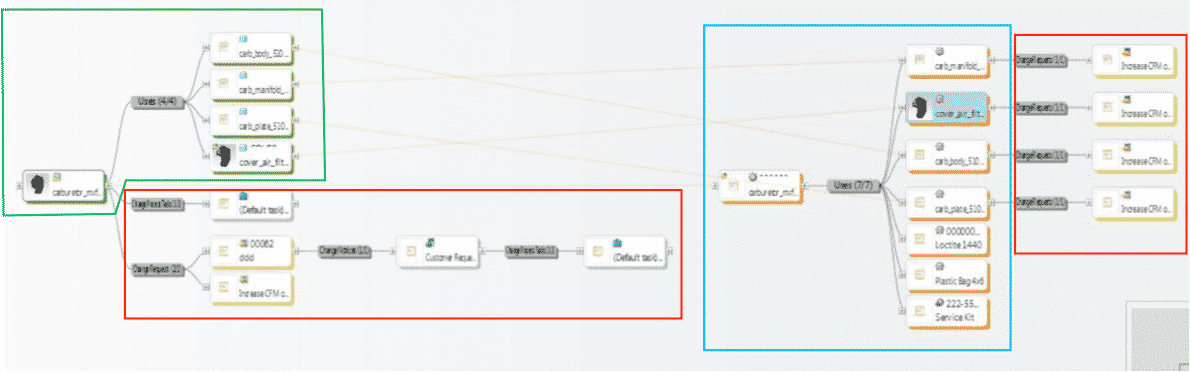
1st example shows all BoM & change components all connected in one system vs. manually done in silo fashion, which is industry’s most common method today. These examples are shown in PTCs Windchill reference viewer tool, which ties all related objects into view for easy visibility with just a few clicks.
- 1. EBoM structure (highlighted in green)
- 2. Change requests, notices and tasks (highlighted in red)
- 3. MBoM structure (highlighted in blue) with their own, or connected Change Management Requests, Notices & Tasks
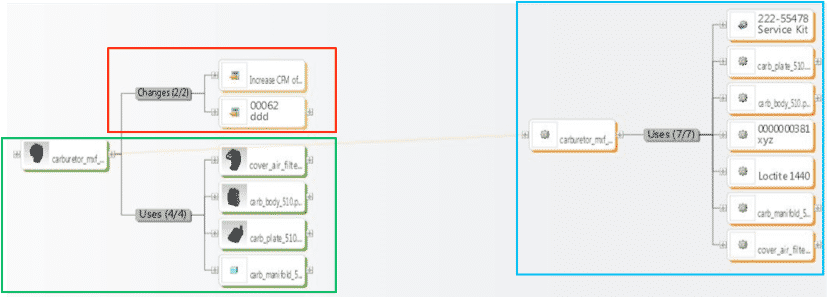
2ndexample shows an EBoM, SBoM (Service Kit in this example), with a saleable end item service kit, as well as components for service or manufacturing BoMs. It also shows Changes, these can also be created, edited, routed, approved or rejected, and even include the SBoM if need be.
Please connect with EAC to learn more, to discover your company’s transformation opportunities with an assessment, maybe see a demo, or attend a webinar. The goal is to help your company transform how you design, manufacture, connect to and service your products.
